AutoFill to PC: Link & Sync


AutoFill to PC: Link & Sync Summary
AutoFill to PC: Link & Sync is a mobile Android app in Tools by Ovadya Apps. Released in May 2026 (4 months ago). It has about 11+ installs Based on AppGoblin estimates, it reaches roughly 1.00 monthly active users . Store last updated Jul 21, 2026
AutoFill to PC: Link & Sync SDKs Summary
App not yet scanned for SDKs.
0★
Ratings: 0
Screenshots



App Description
Securely sync text and notifications from Android to PC over local Wi-Fi
🚀 Streamline Your Workflow with Seamless PC Integration!
Tired of manually typing login details, secure links, or notification texts from your phone to your computer? This lightweight utility tool connects your Android device directly to your personal computer over your local Wi-Fi, making data entry instant and effortless.
🤔 How It Works:
When your phone receives a specific secure notification, text, or authentication entry, the app instantly detects it and securely syncs it with your computer. A companion automation script running on your PC then types it directly into your active browser tab or text field—no manual typing required!
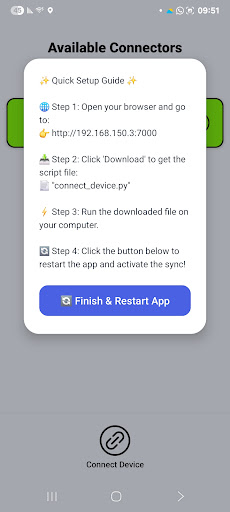
🛠️ Super Simple 4-Step Setup:
1️⃣ Connect to Wi-Fi: Ensure both your phone and PC are on the same local network.
2️⃣ Open Setup Guide: Tap the "Connect Device" button at the bottom of the app.
3️⃣ Get the File: Visit the custom local URL shown on your screen using your PC browser to download your companion sync file.
4️⃣ Run & Refresh: Run the file on your PC, hit the refresh button in the app, and enjoy instant autofill sync!
🌟 Key Features:
• ⚡ Instant Input: Automate your digital workspace by bridging the gap between mobile alerts and desktop forms.
• 📱 Universal Compatibility: Optimized to run perfectly and smoothly across a wide range of Android versions, including older devices.
• 🎨 Clean & Minimal UI: A refreshed, modern interface designed to let you manage your connections with zero clutter.
• ⬇️ Swipe-to-Scan: Easily refresh and scan your local network for active companion devices with a single gesture.
🔒 Private, Local & Secure:
Your security is our top priority. This application operates 100% locally within your own home or office Wi-Fi network.
• 🚫 No External Servers: No data ever leaves your local network.
• 🚫 No Logs or Cloud Storage: Your synced text and notifications are never saved, tracked, or shared.
• 🛡️ Complete Privacy: Pure peer-to-peer communication between your personal devices.
Boost your daily productivity and eliminate manual typing. Download now and link your devices in seconds!