Meeting Room Schedule

Meeting Room Schedule Summary
Meeting Room Schedule is a with in-app purchases Android app in Business by Schedule Display. Released in Jun 2017 (8 years ago). It has about 18.1K+ installs and 48 ratings with a 4.00★ (good) average. Based on AppGoblin estimates, it reaches roughly 651 monthly active users and generates around $<10K monthly revenue (100% IAP / 0% ads). Store metadata: updated Oct 21, 2025.
Recent activity: 25 installs this week (1.1K over 4 weeks) showing exceptional growth View trends →
Store info: Last updated on Google Play on Oct 21, 2025 .
4★
Ratings: 48
Screenshots



App Description
Display the schedule of conference rooms on a tablet (door display)
Get an Android tablet, install the Meeting Room Schedule app, connect to the resource calendar and start operating your door display.
Meeting Room Schedule enables anyone in a company or organization to see the schedule of a conference room instantly. It’s perfect for organizations where meeting rooms are overbooked and collisions are a part of everyday business life.
Please understand that this is an app for displaying calendar content on a mounted tablet device. Unless you close the app, it will always try to display on front.
CONNECTION:
Meeting Room Schedule can be easily connected with most used business services and can be ready for deployment in less than five minutes! No server setup needed.
Sync your calendar display with Microsoft Exchange, Office 365 (O365), Outlook, Google calendar, Google Workspace (formerly Gsuite), ics-links...
HARDWARE:
Works on most Android tablets with OS6 and newer. Consider using professional Android displays. They are made for 7/24 operation and are easy to mount. Visit our website to find compatible tablets with external LEDs.
STYLE:
You can setup tons of different settings for how the meeting info is displayed. Customize font style and size, upload background photos and your company logo.
SECURITY:
Set up an administrator password and activate the kiosk mode to prevent users from accessing other apps.
INTERACTION:
•Reduce late starters and no-show meetings with Auto-Release (Check-in button)
•Improve room utilization by canceling reservations if event ends early (Release button)
•Book the room from the tablet (Book room button)
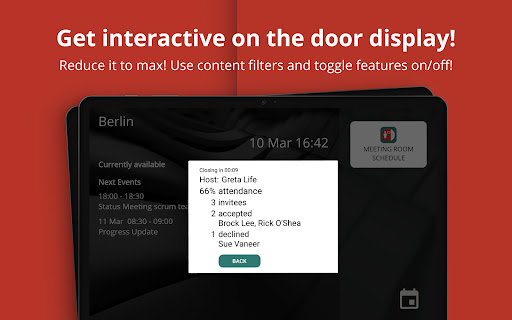
•Check attendance status (Tap on event)
•Check other rooms' status
HOW TO USE:
1- Start by downloading and installing Meeting Room Schedule to your Android device
2- Check out the demo we prepared for you
3- Register with your email
4- Connect your Android device to your source calendar
5- Mount the tablet and enjoy it!
6- If you have questions, check our FAQ and feel free to reach out!!!
Use it for meeting rooms or for displaying any business resource calendar. Consider using it for shared resources like equipment, team calendars, customer appointments or announcements of major events like corporate town hall meetings.