DC Launcher - Android Oreo Sty


DC Launcher - Android Oreo Sty Summary
DC Launcher - Android Oreo Sty is a free, ad-supported Android app in Personalization by Smart Protect Mobile. Released in Jul 2018 (8 years ago). It has about 3.1M+ installs and 20K ratings with a 4.40★ (good) average. Based on AppGoblin estimates, it reaches roughly 51K monthly active users and generates around $<10K monthly revenue (0% IAP / 100% ads). Store last updated Dec 15, 2024
Recent activity: 332 installs this week (732 over 4 weeks) showing below average growth , and -1 new ratings this week View trends →
DC Launcher - Android Oreo Sty SDKs Summary
App not yet scanned for SDKs.
4.4★
Ratings: 20K
Screenshots



App Description
The clean, fast, simple and smooth launcher, with Android Oreo Design.
DC Launcher is a modern Android 8.0 Oreo and Android P launcher style, clean & simple launcher. DC Launcher is the wonderful choice for Android users due to the nice Android original design and the customization features.
☆ Get the cleaner, faster and simpler launcher right now! ☆
Key Features:
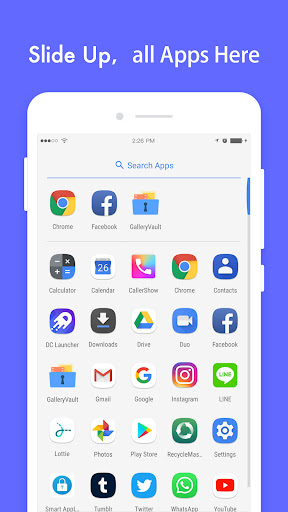
• Original Launcher design: Swipe up from your dock to reveal the screen All Apps mode.
• App Shortcuts: Use Android 8's App Shortcuts on devices running Android 5.1 or later.
• Smart App Drawers: Recent Apps shown at the top! Shortcuts for new apps automatically added in the screen!
• Adaptive Icon: Devices running Oreo can use native Adaptive Icon.
• Google Quick SearchBar integration!
• Notification Dots: Icon badges can be enabled on Devices running above Android 6.0 to indicate unread notifications!
• Full phone, phablet and tablet support.
Helpful Tips:
- Access Settings: Long tap on empty room on the home screen
- Create Folders: Long tap an icon and drag it over another one.
- App Options: Long tap on icons to access app options.
- Remove apps from Home Screen: long tap on an icon, drag and drop the icon over the “Remove” button at the top of the screen.
About :
Howdy folks! This is our initial version and we'll definitely add way more cool features in the future! If you like what you see, spread the world and kindly rate us five stars to encourage us. If you have some ideas and suggestions, please DO NOT hesitate to contact us at dclauncher@thinkyeah.com