Evoque KWGT


Evoque KWGT Summary
Evoque KWGT is a mobile Android app in Personalization by Droid Beauty. Released in Nov 2019 (6 years ago). It has about 2.1K+ installs and 71 ratings with a 5.00★ (excellent) average. Based on AppGoblin estimates, it reaches roughly 28 monthly active users . Store metadata: updated Mar 17, 2026.
Recent activity: 9.00 installs this week (35 over 4 weeks) showing above average growth View trends →
Store info: Last updated on Google Play on Mar 17, 2026 .
5★
Ratings: 71
Screenshots


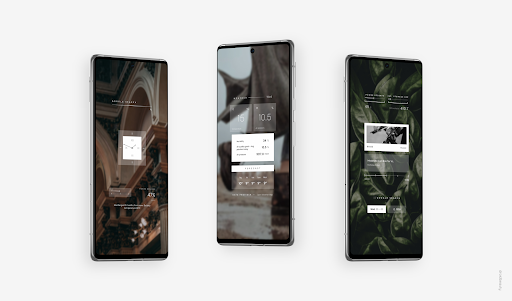
App Description
Widgets like no other
Evoque - widgets like no other. A touch of aesthetic luxury delivered to your homescreen
Your homescreen is a highly flexible space. And it should deliver exactly what you expect from it. Evoque is here to add a touch of opulence to your Android experience
With widgets based on geometric figures and stylish font combinations you can achieve a setup that delivers all the essentials in an exquisite way. Reaching this special sense of calm, organized and timeless homescreen is possible through the art of subtraction
Evoque brings next-tier themes to make your device more personal, more unique, more artisanal. Most importantly - exactly up to your taste
The design language of Evoque has been untypically excerpted from various elements in design of luxurious objects - yachts, hi-end cars and modern architecture. That's why its visual qualities are like no other widget pack. It allows your setup to stand out of the crowd in a bold yet ultra minimalistic way
Features
- 150+ widgets to choose from
- diverse & stylish design which maintains usable features
- great readability of each widget thanks to streamlined typography
- time / weather / date info & more
- color customization available for all widgets in this collection
How to use
- Install Kustom KWGT
- open the app and select 'Load Preset' from sidebar menu
- choose the widget you like and click save
- if the size doesn't fit your screen change the 'layer' setting in the main widget menu
- enjoy the new look of your homescreen
Evoque is not a standalone app. You need KWGT Pro in order to use provided widgets and make any changes to them. Always use KWGT installed from Play Store and not patched Pro version of the app from 3rd party websites!