GPS Joystick: Location changer

GPS Joystick: Location changer Summary
GPS Joystick: Location changer is a ad-supported, with in-app purchases Android app in Maps And Navigation by Wonderful AI. Released in Jan 2024 (2 years ago). It has about 115.1K+ installs and 369 ratings with a 2.56★ (poor) average. Based on AppGoblin estimates, it reaches roughly 7.6K monthly active users and generates around $<10K monthly revenue (53% IAP / 47% ads). Store metadata: updated Oct 13, 2025, version 9.
Recent activity: 2.9K installs this week (5.1K over 4 weeks) showing exceptional growth , and 1.00 new ratings this week View trends →
Advertising: AppGoblin detected 1.00 monetized ad creatives shown inside the app.
Data tracking: SDKs and third-party integrations were last analyzed on Mar 10, 2026. The app's network data flows (API traffic to/from the app and its SDKs) were last crawled on Oct 30, 2025.
Store info: Last updated on Google Play on Oct 13, 2025 (version 9).
GPS Joystick: Location changer was last scanned for SDKs 2026-03-10. Below is the overview of third party companies detected in the app. The full list of raw SDKs, app permissions and unknown SDKs is available here.
 Greenrobot
 Google
 Kotlin
 Airbnb Engineering
 Alipay
 Facebook
 AppLovin
 Firebase
 AdMob
AdMob2.56★
Ratings: 369
Screenshots



App Description
Move your GPS location with one click, supporting joystick and route modes
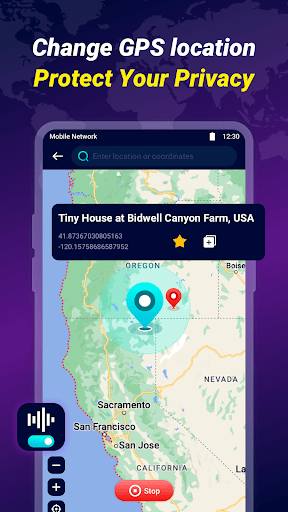
GPS Joystick: Location changer is an application that change GPS locations. Use this app to move your phone to anywhere in the world with one click, making it easy and fun to change your location instantly. We will not only protect your privacy and hide your real location, but also change the location.
Features:
1. Change GPS Location: Change your phone location to anywhere in the world
2. GPS joystick: supports 360° all-round movement. After selecting a location, set the direction and move in real time at a custom speed.
3. GPS route: supports multi-point routes, and you can choose to adjust walking, cycling, motorcycle or driving speed to obtain a more realistic route.
4. GPS Teleport: Easily transport your phone to anywhere in the world.
5. Search location: Support search keywords to find the location.
6. History: Record detailed history of changing GPS location.
7. Favorite location: Save your favorite address and click it directly next time.
8. Protect privacy: prevent anyone from tracking your GPS signal
9. For developer testing purposes.
How to use:
1. You need to activate the developer mode first: Settings->About Phone->Software->Version Number (7 clicks).
2. Before starting to change the location, you need to grant relevant permissions from Settings>Developer Options
Please Note:
1. GPS Joystick: Location changer will only change the phone's GPS location, not the phone's IP address. Your phone's network will not be affected.
2. We do not support any improper use of the application (including traps). If you use it for this purpose, you will be responsible for the consequences and we will not be responsible for it.