Swarachakra Malayalam Keyboard
ASO Keyword Dashboard
Tracking 100 keywords for Swarachakra Malayalam Keyboard in Google Play

Swarachakra Malayalam Keyboard tracks 100 keywords (no keywords rank yet; 100 need traction). Key metrics: opportunity 70.5, difficulty 45.7.
Swarachakra is a logically ordered keyboard, found to be easy to use for newbies
Tracked keywords
100
0 ranked • 100 not ranking yet
Top 10 coverage
—
Best rank — • Latest leader —
Avg opportunity
70.5
Top keyword: structure
Avg difficulty
45.7
Lower scores indicate easier wins
Opportunity leaders
- 62.9
structure
Opportunity: 74.0 • Difficulty: 39.1 • Rank —
Competitors: 258
- 64.8
frequently
Opportunity: 74.0 • Difficulty: 47.8 • Rank —
Competitors: 639
- 66.2
preview
Opportunity: 74.0 • Difficulty: 55.4 • Rank —
Competitors: 1,010
- 66.3
finger
Opportunity: 74.0 • Difficulty: 48.3 • Rank —
Competitors: 1,357
- 65.8
box
Opportunity: 74.0 • Difficulty: 43.4 • Rank —
Competitors: 889
Unranked opportunities
structure
Opportunity: 74.0 • Difficulty: 39.1 • Competitors: 258
frequently
Opportunity: 74.0 • Difficulty: 47.8 • Competitors: 639
preview
Opportunity: 74.0 • Difficulty: 55.4 • Competitors: 1,010
finger
Opportunity: 74.0 • Difficulty: 48.3 • Competitors: 1,357
box
Opportunity: 74.0 • Difficulty: 43.4 • Competitors: 889
High competition keywords
new
Total apps: 367,776 • Major competitors: 23,553
Latest rank: — • Difficulty: 58.6
easy
Total apps: 326,740 • Major competitors: 16,164
Latest rank: — • Difficulty: 56.4
like
Total apps: 290,495 • Major competitors: 22,576
Latest rank: — • Difficulty: 60.6
designed
Total apps: 260,108 • Major competitors: 8,465
Latest rank: — • Difficulty: 53.6
available
Total apps: 200,888 • Major competitors: 10,487
Latest rank: — • Difficulty: 58.2
All tracked keywords
Includes opportunity, difficulty, rankings and competitor benchmarks
| Major Competitors | |||||||
|---|---|---|---|---|---|---|---|
| new | 65 | 100 | 59 | 89 367,776 competing apps Median installs: 3,159 Avg rating: 4.0 | — | — | 23,553 major competitor apps |
| character | 72 | 100 | 47 | 70 24,383 competing apps Median installs: 8,258 Avg rating: 4.0 | — | — | 2,303 major competitor apps |
| right | 67 | 100 | 57 | 83 160,086 competing apps Median installs: 1,939 Avg rating: 4.0 | — | — | 8,858 major competitor apps |
| device | 68 | 100 | 60 | 80 108,562 competing apps Median installs: 3,348 Avg rating: 3.9 | — | — | 6,822 major competitor apps |
| easy | 65 | 100 | 56 | 88 326,740 competing apps Median installs: 2,524 Avg rating: 4.0 | — | — | 16,164 major competitor apps |
| language | 69 | 100 | 53 | 76 62,347 competing apps Median installs: 3,020 Avg rating: 4.2 | — | — | 2,694 major competitor apps |
| words | 70 | 100 | 48 | 74 46,475 competing apps Median installs: 4,876 Avg rating: 4.3 | — | — | 1,979 major competitor apps |
| particularly | 73 | 100 | 36 | 58 4,446 competing apps Median installs: 1,922 Avg rating: 4.1 | — | — | 122 major competitor apps |
| design | 68 | 100 | 52 | 80 100,141 competing apps Median installs: 1,963 Avg rating: 4.1 | — | — | 4,915 major competitor apps |
| used | 68 | 100 | 54 | 81 115,888 competing apps Median installs: 3,156 Avg rating: 4.0 | — | — | 5,095 major competitor apps |
| designed | 66 | 100 | 54 | 86 260,108 competing apps Median installs: 843 Avg rating: 4.0 | — | — | 8,465 major competitor apps |
| option | 70 | 100 | 49 | 74 47,530 competing apps Median installs: 3,040 Avg rating: 4.1 | — | — | 2,534 major competitor apps |
| available | 66 | 100 | 58 | 84 200,888 competing apps Median installs: 2,598 Avg rating: 4.0 | — | — | 10,487 major competitor apps |
| key | 68 | 100 | 52 | 81 122,251 competing apps Median installs: 1,373 Avg rating: 4.0 | — | — | 5,893 major competitor apps |
| touch | 69 | 100 | 52 | 76 63,332 competing apps Median installs: 1,850 Avg rating: 4.0 | — | — | 3,743 major competitor apps |
| install | 70 | 100 | 49 | 76 59,316 competing apps Median installs: 3,185 Avg rating: 4.1 | — | — | 2,855 major competitor apps |
| combination | 73 | 100 | 45 | 67 15,697 competing apps Median installs: 3,024 Avg rating: 4.0 | — | — | 1,134 major competitor apps |
| english | 70 | 100 | 48 | 74 46,977 competing apps Median installs: 4,014 Avg rating: 4.2 | — | — | 2,017 major competitor apps |
| text | 69 | 100 | 57 | 78 77,952 competing apps Median installs: 4,532 Avg rating: 4.1 | — | — | 4,676 major competitor apps |
| click | 69 | 100 | 50 | 77 67,099 competing apps Median installs: 4,332 Avg rating: 4.1 | — | — | 4,031 major competitor apps |
| open | 68 | 100 | 54 | 79 96,975 competing apps Median installs: 4,251 Avg rating: 4.0 | — | — | 7,355 major competitor apps |
| part | 69 | 100 | 53 | 77 67,526 competing apps Median installs: 1,848 Avg rating: 4.0 | — | — | 3,175 major competitor apps |
| type | 70 | 100 | 52 | 75 49,653 competing apps Median installs: 3,942 Avg rating: 4.0 | — | — | 2,859 major competitor apps |
| like | 65 | 100 | 61 | 87 290,495 competing apps Median installs: 4,554 Avg rating: 4.0 | — | — | 22,576 major competitor apps |
| see | 67 | 100 | 58 | 83 164,314 competing apps Median installs: 2,008 Avg rating: 4.0 | — | — | 8,202 major competitor apps |
App Description
Swarachakra is a logically ordered keyboard, found to be easy to use for newbies
Swarachakra Malayalam (സ്വരചക്ര മലയാളം) is a touch-screen keyboard for inputting text in Malayalam. (It is available in Telugu, Kannada, Tamil, Hindi, Marathi, Gujarati, Odia, Punjabi, Bengali and Konkani). It uses a logically ordered design based on the structure of Malayalam. It displays the consonants sequenced according to the logical structure of Malayalam, phonetically grouped and arranged in a grid similar to those found in most school textbooks.
How to type
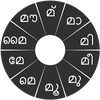
In Malayalam, we frequently need to type a combination of a consonant(ക) and a vowel (േ) like ക + േ = കേ. When you touch a consonant, a chakra with combination of consonants and 10 frequent vowels pops up (കാ, കി, കീ, കു, കൂ, കെ, കേ, കൈ, കൗ, ക്). The chakra gives a preview of the possible character combinations. To select a combination, you slide the stylus or finger towards it.
Typing conjuncts like ക്രി, സ്ഥ, ച്യ is particularly hard for most people. Swarachakra makes it easy. First tap on the first part of the combination and select the chandrakala from the chakra (സ + ്). Swarachakra then shows a preview of all possible conjuncts that begin with that consonant (സ + ് + ഥ = സ്ഥ). If you need to add a vowel sign, select it from the new chakra like earlier (സ്ഥാ, സ്ഥി, സ്ഥീ, സ്ഥു, സ്ഥൂ, സ്ഥെ, സ്ഥേ,…).
To type ശ്ര, കൃ, select the corresponding key ്ര, ൃ from the right-most bottom keys, and then type as usual.
To type chillu (ൺ, ൻ, ർ, ൽ, ൾ), select the corresponding key S from the bottom of the keyboard. The less used vowels and modifiers are next to it(ഌ, ൄ, ൌ, ം, ഃ )
Complete vowels (അ, ആ, ഇ, ഈ, ഉ, ഊ, ഋ, എ, ഐ, ഒ, ഔ) appear in a separate chakra on the bottom right. Numerals, symbols and rarely used characters appear on a shift. You could also switch to the QWERTY keypad temporarily to input English characters.
How to install
First, install Swarachakra Malayalam by clicking the “Install” button above.
Next, you need to “enable” the keyboard. To enable, open “Settings”, select “Language and Input” and check the box in front of സ്വരചക്ര മലയാളം(Swarachakra Malayalam) in the “Keyboard and input methods” section.
Finally, click on the “Default” option in the “Keyboard and input methods” section, and select സ്വരചക്ര മലയാളം (Swarachakra Malayalam) as the default keyboard. (Sorry, but that’s how Android works)
NOTE: This app is designed for Android 4.0 (ICS) onwards. It does not work right now on older versions because they do not have Unicode support.
