Swarachakra Odia Keyboard
ASO Keyword Dashboard
Tracking 102 keywords for Swarachakra Odia Keyboard in Google Play

Swarachakra Odia Keyboard tracks 102 keywords (no keywords rank yet; 102 need traction). Key metrics: opportunity 70.6, difficulty 46.1.
Swarachakra is a logically ordered keyboard, found to be easy to use for newbies
Tracked keywords
102
0 ranked • 102 not ranking yet
Top 10 coverage
—
Best rank — • Latest leader —
Avg opportunity
70.6
Top keyword: structure
Avg difficulty
46.1
Lower scores indicate easier wins
Opportunity leaders
- 62.9
structure
Opportunity: 74.0 • Difficulty: 39.1 • Rank —
Competitors: 258
- 64.9
frequently
Opportunity: 74.0 • Difficulty: 47.8 • Rank —
Competitors: 642
- 66.2
preview
Opportunity: 74.0 • Difficulty: 55.4 • Rank —
Competitors: 1,010
- 66.3
finger
Opportunity: 74.0 • Difficulty: 48.4 • Rank —
Competitors: 1,357
- 65.8
box
Opportunity: 74.0 • Difficulty: 43.4 • Rank —
Competitors: 888
Unranked opportunities
structure
Opportunity: 74.0 • Difficulty: 39.1 • Competitors: 258
frequently
Opportunity: 74.0 • Difficulty: 47.8 • Competitors: 642
preview
Opportunity: 74.0 • Difficulty: 55.4 • Competitors: 1,010
finger
Opportunity: 74.0 • Difficulty: 48.4 • Competitors: 1,357
box
Opportunity: 74.0 • Difficulty: 43.4 • Competitors: 888
High competition keywords
new
Total apps: 367,866 • Major competitors: 23,577
Latest rank: — • Difficulty: 58.6
easy
Total apps: 326,824 • Major competitors: 16,187
Latest rank: — • Difficulty: 56.4
like
Total apps: 290,477 • Major competitors: 22,578
Latest rank: — • Difficulty: 60.6
designed
Total apps: 260,161 • Major competitors: 8,471
Latest rank: — • Difficulty: 53.6
available
Total apps: 200,864 • Major competitors: 10,487
Latest rank: — • Difficulty: 58.2
All tracked keywords
Includes opportunity, difficulty, rankings and competitor benchmarks
| Major Competitors | |||||||
|---|---|---|---|---|---|---|---|
| new | 65 | 100 | 59 | 89 367,866 competing apps Median installs: 3,163 Avg rating: 4.0 | — | — | 23,577 major competitor apps |
| character | 72 | 100 | 47 | 70 24,384 competing apps Median installs: 8,259 Avg rating: 4.0 | — | — | 2,304 major competitor apps |
| right | 67 | 100 | 57 | 83 160,073 competing apps Median installs: 1,938 Avg rating: 4.0 | — | — | 8,858 major competitor apps |
| device | 68 | 100 | 60 | 80 108,544 competing apps Median installs: 3,347 Avg rating: 3.9 | — | — | 6,821 major competitor apps |
| easy | 65 | 100 | 56 | 88 326,824 competing apps Median installs: 2,528 Avg rating: 4.0 | — | — | 16,187 major competitor apps |
| language | 69 | 100 | 53 | 76 62,345 competing apps Median installs: 3,019 Avg rating: 4.2 | — | — | 2,693 major competitor apps |
| words | 70 | 100 | 48 | 74 46,490 competing apps Median installs: 4,886 Avg rating: 4.3 | — | — | 1,983 major competitor apps |
| particularly | 73 | 100 | 36 | 58 4,446 competing apps Median installs: 1,922 Avg rating: 4.1 | — | — | 122 major competitor apps |
| design | 68 | 100 | 52 | 80 100,131 competing apps Median installs: 1,962 Avg rating: 4.1 | — | — | 4,915 major competitor apps |
| used | 68 | 100 | 54 | 81 115,921 competing apps Median installs: 3,160 Avg rating: 4.0 | — | — | 5,101 major competitor apps |
| designed | 66 | 100 | 54 | 86 260,161 competing apps Median installs: 843 Avg rating: 4.0 | — | — | 8,471 major competitor apps |
| option | 70 | 100 | 49 | 74 47,528 competing apps Median installs: 3,039 Avg rating: 4.1 | — | — | 2,533 major competitor apps |
| available | 66 | 100 | 58 | 84 200,864 competing apps Median installs: 2,596 Avg rating: 4.0 | — | — | 10,487 major competitor apps |
| key | 68 | 100 | 52 | 81 122,189 competing apps Median installs: 1,370 Avg rating: 4.0 | — | — | 5,878 major competitor apps |
| touch | 69 | 100 | 52 | 76 63,328 competing apps Median installs: 1,850 Avg rating: 4.0 | — | — | 3,741 major competitor apps |
| install | 70 | 100 | 49 | 76 59,306 competing apps Median installs: 3,182 Avg rating: 4.1 | — | — | 2,852 major competitor apps |
| combination | 73 | 100 | 45 | 67 15,696 competing apps Median installs: 3,024 Avg rating: 4.0 | — | — | 1,132 major competitor apps |
| english | 70 | 100 | 48 | 74 46,975 competing apps Median installs: 4,014 Avg rating: 4.2 | — | — | 2,018 major competitor apps |
| text | 69 | 100 | 57 | 78 77,939 competing apps Median installs: 4,528 Avg rating: 4.1 | — | — | 4,676 major competitor apps |
| click | 69 | 100 | 50 | 77 67,102 competing apps Median installs: 4,332 Avg rating: 4.1 | — | — | 4,032 major competitor apps |
| open | 68 | 100 | 54 | 79 96,952 competing apps Median installs: 4,244 Avg rating: 4.0 | — | — | 7,347 major competitor apps |
| part | 69 | 100 | 53 | 77 67,540 competing apps Median installs: 1,849 Avg rating: 4.0 | — | — | 3,180 major competitor apps |
| type | 70 | 100 | 52 | 75 49,652 competing apps Median installs: 3,942 Avg rating: 4.0 | — | — | 2,860 major competitor apps |
| like | 65 | 100 | 61 | 87 290,477 competing apps Median installs: 4,553 Avg rating: 4.0 | — | — | 22,578 major competitor apps |
| see | 67 | 100 | 58 | 83 164,355 competing apps Median installs: 2,010 Avg rating: 4.0 | — | — | 8,214 major competitor apps |
App Description
Swarachakra is a logically ordered keyboard, found to be easy to use for newbies
Swarachakra Odia (ସ୍ଵର ଚକ୍ର ଓଡ଼ିଆ) is a touch-screen keyboard for inputting text in Odia. (Swarachakra is available in Hindi, Marathi, Gujarati, Telugu, Kannada, Malayalam, Punjabi, Bengali, Konkani and Tamil). Swarachakra Odia (ସ୍ଵର ଚକ୍ର ଓଡ଼ିଆ) uses a logically ordered design based on the structure of Odia script (ଓଡିଆ ବର୍ଣ ମାଳା). Swarachakra Odia (ସ୍ଵର ଚକ୍ର ଓଡ଼ିଆ) displays the consonants sequenced according to the logical structure of Odia script (ଓଡିଆ ବର୍ଣ ମାଳା), phonetically grouped and arranged in a grid similar to those found in most school textbooks.
Typing with Swarachakra Odia
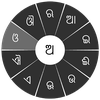
In Odia (ଓଡିଆ), we frequently need to type a combination of a consonant (କ) and a matra (ମାତ୍ରା) (ା) like କ + ା = କା. When you touch a consonant, a chakra with combination of consonants and 10 frequent matras (ମାତ୍ରା) pops up (କା, କି, କୀ, କୁ, କୂ, କେ, କୈ, କୋ...). The chakra gives a preview of the possible character combinations. To select a combination, you slide the stylus or finger towards it.
Typing conjuncts like କ୍ରି, ସ୍ଥ, ଚ୍ୟ is particularly hard for most people. Swarachakra makes it easy. First tap on the first part of the combination and select the halant from the chakra (କ + ୍). Swarachakra then shows a preview of all possible conjuncts that begin with that consonant (ସ + ୍ + ତ = ସ୍ତ; ସ + ् + ଥ = ସ୍ଥ...). If you need to add a matra, select it from the new chakra like earlier (ସ୍ଥା, ସ୍ଥି, ସ୍ଥୀ, ସ୍ଥୁ, ସ୍ଥୂ...).
To type ref (ରେଫ୍ ଯୋଗ) (ର୍ଥ), a phala ଫଳା (ଦ୍ମ୍, କ୍ୟ, ଗ୍ନ..) or adho bindu jukta letter ଅଧୋ ବିନ୍ଦୁ ଯୁକ୍ତ ବର୍ଣ (ଡ଼, ଢ଼), first select the corresponding key from the right-most bottom keys, and then type as usual.
Complete vowels (ଅ, ଆ, ଇ, ଈ, ଉ, ଊ, ଏ, ଐ, ଓ, ଔ) appear in a separate chakra on the bottom right. The less used vowels and matras are next to it (ଃ, ଂ, ଁ, ୠ, ୃୄ). Numerals, symbols and rarely used characters appear on a shift. You could also switch to the QWERTY keypad temporarily to input English characters.
Installing Swarachakra
First, install Swarachakra Odia by clicking the “Install” button above.
Next, you need to “enable” the keyboard. To enable, open “Settings”, select “Language and Input” and check the box in front of ସ୍ଵର ଚକ୍ର ଓଡ଼ିଆ (Swarachakra Odia) in the “Keyboard and input methods” section.
Finally, click on the “Default” option in the “Keyboard and input methods” section, and select ସ୍ଵର ଚକ୍ର ଓଡ଼ିଆ (Swarachakra Odia) as the default keyboard. (Sorry, but that’s how Android works)
NOTE: Swarachakra is designed for Android 4.0 (ICS) onwards. It does not work right now on older versions because they do not have Unicode support.
