Swarachakra Punjabi Keyboard

40.5K installs
733 ratings
5.00 monthly active users
Revenue not available
Install Trends
Weekly +1.00
Steady
Monthly +2.00
Steady
Swarachakra Punjabi Keyboard icon

ASO Keyword Dashboard

Tracking 78 keywords for Swarachakra Punjabi Keyboard in Google Play

Developer: Swarachakra Team, IDC, IIT Bombay Category: communication Rating: 4.77

Swarachakra Punjabi Keyboard tracks 78 keywords (no keywords rank yet; 78 need traction). Key metrics: opportunity 70.7, difficulty 46.7.

Swarachakra is a logically ordered keyboard, found to be easy to use for newbies

Tracked keywords

78

0  ranked •  78  not ranking yet

Top 10 coverage

Best rank — • Latest leader —

Avg opportunity

70.7

Top keyword: structure

Avg difficulty

46.7

Lower scores indicate easier wins

Opportunity leaders

  • structure

    Opportunity: 74.0 • Difficulty: 39.1 • Rank —

    Competitors: 258

    62.9
  • frequently

    Opportunity: 74.0 • Difficulty: 47.8 • Rank —

    Competitors: 642

    64.9
  • preview

    Opportunity: 74.0 • Difficulty: 55.4 • Rank —

    Competitors: 1,010

    66.2
  • finger

    Opportunity: 74.0 • Difficulty: 48.4 • Rank —

    Competitors: 1,357

    66.3
  • box

    Opportunity: 74.0 • Difficulty: 43.4 • Rank —

    Competitors: 888

    65.8

Unranked opportunities

  • structure

    Opportunity: 74.0 • Difficulty: 39.1 • Competitors: 258

  • frequently

    Opportunity: 74.0 • Difficulty: 47.8 • Competitors: 642

  • preview

    Opportunity: 74.0 • Difficulty: 55.4 • Competitors: 1,010

  • finger

    Opportunity: 74.0 • Difficulty: 48.4 • Competitors: 1,357

  • box

    Opportunity: 74.0 • Difficulty: 43.4 • Competitors: 888

High competition keywords

  • easy

    Total apps: 326,824 • Major competitors: 16,187

    Latest rank: — • Difficulty: 56.4

  • like

    Total apps: 290,477 • Major competitors: 22,578

    Latest rank: — • Difficulty: 60.6

  • designed

    Total apps: 260,161 • Major competitors: 8,471

    Latest rank: — • Difficulty: 53.6

  • available

    Total apps: 200,864 • Major competitors: 10,487

    Latest rank: — • Difficulty: 58.2

  • see

    Total apps: 164,355 • Major competitors: 8,214

    Latest rank: — • Difficulty: 58.2

All tracked keywords

Includes opportunity, difficulty, rankings and competitor benchmarks

Major Competitors
character721004770

24,384 competing apps

Median installs: 8,259

Avg rating: 4.0

2,304

major competitor apps

device681006080

108,544 competing apps

Median installs: 3,347

Avg rating: 3.9

6,821

major competitor apps

easy651005688

326,824 competing apps

Median installs: 2,528

Avg rating: 4.0

16,187

major competitor apps

language691005376

62,345 competing apps

Median installs: 3,019

Avg rating: 4.2

2,693

major competitor apps

words701004874

46,490 competing apps

Median installs: 4,886

Avg rating: 4.3

1,983

major competitor apps

design681005280

100,131 competing apps

Median installs: 1,962

Avg rating: 4.1

4,915

major competitor apps

used681005481

115,921 competing apps

Median installs: 3,160

Avg rating: 4.0

5,101

major competitor apps

designed661005486

260,161 competing apps

Median installs: 843

Avg rating: 4.0

8,471

major competitor apps

option701004974

47,528 competing apps

Median installs: 3,039

Avg rating: 4.1

2,533

major competitor apps

available661005884

200,864 competing apps

Median installs: 2,596

Avg rating: 4.0

10,487

major competitor apps

touch691005276

63,328 competing apps

Median installs: 1,850

Avg rating: 4.0

3,741

major competitor apps

install701004976

59,306 competing apps

Median installs: 3,182

Avg rating: 4.1

2,852

major competitor apps

combination731004567

15,696 competing apps

Median installs: 3,024

Avg rating: 4.0

1,132

major competitor apps

english701004874

46,975 competing apps

Median installs: 4,014

Avg rating: 4.2

2,018

major competitor apps

text691005778

77,939 competing apps

Median installs: 4,528

Avg rating: 4.1

4,676

major competitor apps

click691005077

67,102 competing apps

Median installs: 4,332

Avg rating: 4.1

4,032

major competitor apps

open681005479

96,952 competing apps

Median installs: 4,244

Avg rating: 4.0

7,347

major competitor apps

type701005275

49,652 competing apps

Median installs: 3,942

Avg rating: 4.0

2,860

major competitor apps

like651006187

290,477 competing apps

Median installs: 4,553

Avg rating: 4.0

22,578

major competitor apps

see671005883

164,355 competing apps

Median installs: 2,010

Avg rating: 4.0

8,214

major competitor apps

work681005581

122,446 competing apps

Median installs: 1,894

Avg rating: 4.0

5,296

major competitor apps

check671005782

137,032 competing apps

Median installs: 2,115

Avg rating: 4.0

7,575

major competitor apps

school701004876

57,246 competing apps

Median installs: 877

Avg rating: 4.0

1,913

major competitor apps

structure741003963

8,873 competing apps

Median installs: 1,236

Avg rating: 4.1

258

major competitor apps

frequently741004865

11,835 competing apps

Median installs: 4,295

Avg rating: 4.0

642

major competitor apps

78 keywords
1 of 4

App Description

Swarachakra is a logically ordered keyboard, found to be easy to use for newbies

"ਨਾਨਕ ਨਾਮ ਚੜ੍ਹਦੀ ਕਲਾ, ਤੇਰੇ ਭ੍ਹਾਣੇ ਸਰਬਤ ਦਾ ਭਲਾ।” If your device can display this sentence in Punjabi perfectly, then your device supports Punjabi and Swarachakra should also work well. If you do not see any text, or if some of the words are incorrect, Swarachakra may not work well.

Swarachakra Punjabi (ਸ੍ਵਰਚਕ੍ਰ ਪੰਜਾਬੀ) is a touch-screen keyboard for inputting text in Punjabi. (Swarachakra is available in Hindi, Marathi, Gujarati, Telugu, Kannada, Malayalam, Odia, Bengali, Konkani and Tamil.) Swarachakra uses a logically ordered design based on the structure of Gurmukhi. Swarachakra displays the consonants sequenced according to the logical structure of Gurmukhi, phonetically grouped and arranged in a grid similar to those found in most school textbooks.

Typing with Swarachakra
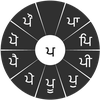
In Gurmukhi, we frequently need to type a combination of a consonant () and a matra () like ਮ+ੈ = ਮੈ. When you touch a consonant, a chakra with combination of consonants and 9 frequent matras pops up (ਮਾ, ਮਿ, ਮੀ, ਮੁ, ਮੂ, ਮੇ, ਮੈ, ਮੋ...). The chakra gives a preview of the possible character combinations. To select a combination, you slide the stylus or finger towards it.
To type a nukta(paer bindi) character (ਸ਼, ਖ਼,ਗ਼,ਜ਼,ਫ਼,ਲ਼), first select the nukta key() present in the right-most column, and then type as usual. Numerals, symbols and rarely used characters appear on a shift. You could also switch to the QWERTY keypad temporarily to input English characters.

Installing Swarachakra

First, install Swarachakra Punjabi by clicking the “Install” button above.
Next, you need to “enable” the keyboard. To enable, open “Settings”, select “Language and Input” and check the box in front of ਸ੍ਵਰਚਕ੍ਰ ਪੰਜਾਬੀ(Swarachakra Punjabi) in the “Keyboard and input methods” section.
Finally, click on the “Default” option in the “Keyboard and input methods” section, and select ਸ੍ਵਰਚਕ੍ਰ ਪੰਜਾਬੀ (Swarachakra Punjabi) as the default keyboard. (Sorry, but that’s how Android works)
NOTE: Swarachakra is designed for Android 4.0 (ICS) onwards. I