Moving Maze & Battle Flag Pos

Moving Maze & Battle Flag Pos Summary
Moving Maze & Battle Flag Pos is a ad-supported Android app in Puzzle by YWH Family. Released in Sep 2021 (4 years ago). It has about 64+ installs Based on AppGoblin estimates, it reaches roughly 2.00 monthly active users and generates around $<10K monthly revenue (0% IAP / 100% ads). Store metadata: updated Dec 27, 2022.
Store info: Last updated on Google Play on Dec 27, 2022 .
0★
Ratings: 0
Screenshots

App Description
Moving Maze & The battle flag pos are novel and interesting game of reasoning.
Super Brain Games: Moving Maze & Battle Flag Position
.
A. Moving Maze
1. About Moveing Maze
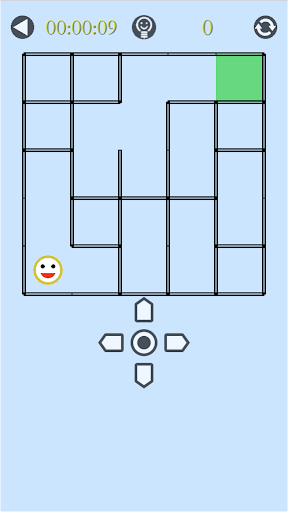
Moving Maze is a novel and interesting game of reasoning. The game aims to move the smiling face from the bottom left corner of the maze to the top right corner. When moving one step, all horizontal walls in the maze move one grid to the left, all vertical walls move down one grid. For every step, the structure of the maze changes. Until you move to the end.
2. How to Play
a. Move: the smiling face can move in four directions, but it cannot pass through the wall. There are three ways to move: click the direction button on the screen, slide on the maze and use the direction key on keyboard(if having).
b. Reset: click the RESET button in the upper right corner.
c. Tip: click the HINT button right above.
B. Battle Flag Position
1. About flag positions
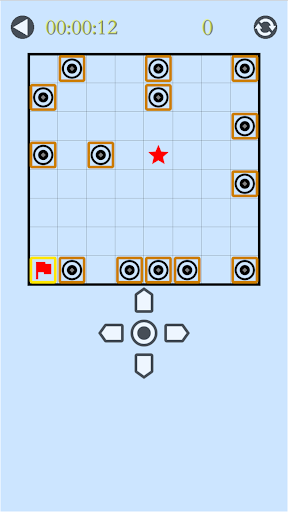
The battle flag position is a novel and interesting game of reasoning. There is a battle flag and several fortresses on the square chessboard. The purpose of the game is to move the battle flag to the target position(star). It will not stop until it meets other pieces, otherwise it will be removed from the chessboard.
2. How to play
a. Move: flags and fortresses can move in four directions. After selecting a piece, there are three ways to move it: directly slide up, down, left and right, click the direction button on the screen, and use the direction key of the keyboard (if any).
b. Reset: click the RESET button in the upper right corner.