Csilszim


Csilszim Summary
Csilszim is a mobile Android app in Education by WITHLET11. Released in Aug 2023 (2 years ago). It has about 21+ installs Based on AppGoblin estimates, it reaches roughly 1.00 monthly active users . Store metadata: updated Aug 24, 2025.
Store info: Last updated on Google Play on Aug 24, 2025 .
0★
Ratings: 0
Screenshots



App Description
An astronomical simulator for Android
This is an astronomical simulator for Android. It provides useful information for observation of Messier objects, planets and so on.
Clocks:
This is a set of clocks of UTC, Standard time, Mean solar time and sidereal time. Zodiac signs are displayed on the panel of sidereal time. You can know the constellation is across the observer’s local meridian.
Momentary view:
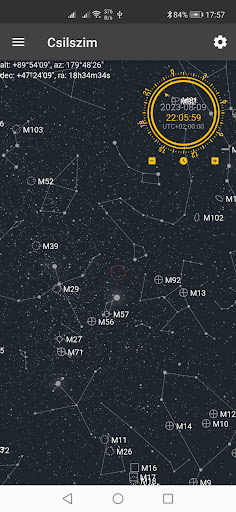
This view shows the positions of celestial objects at the specified location and the specified date and time. The date and time can be selected a dial at the top right corner. One turn is equivalent to 1 day at 'date mode', or 24 hours at 'time mode'. Daylight saving time is supported. During daylight saving time, the scale ring is turned counterclockwise. The '0h' direction of scale ring depends on midnight of January 1. You can change the date and time by dragging/swiping along the circle part of the dial. 'Date mode' and 'time mode' can be switched by clicking/tapping at the center. The center red circle is a FOV. You can use it as a reference for how it looks in the finder. It can be changed between 1 and 10 degrees. The sizes of solar system objects are based on luminosity when zoomed out, and apparent size when zoomed in.
Whole night view:
This view shows the celestial objects that rise above the horizon at the specified site, morning or evening on the specified date. Objects in the blue zone mean objects can be above the horizon during twilight or daytime. Objects in the white zone mean objects that are above the horizon only during the day time. Objects that are never above the horizon are not displayed. Since it is displayed in the Mercator projection, the farther the position is from the celestial equator, the larger the distnace is displayed. The date and time setting dial and the red circle in the center are the same as in Momentary view.
Orbit:
It shows the orbits and positions of the major bodies of the solar system. It will be displayed for the specified number of times at the specified interval from the specified date. Arrows indicate the direction of the vernal equinoxes. You can change the viewpoint position by dragging/swiping. You can zoom in and out with the wheel/pinch. It can display planets and some dwarf planets and comets.
Oject list:
This displays the current celestial positions of Messier objects and bright stars in real time. Displayed in eq