Automatic Captions & Subtitles


Automatic Captions & Subtitles Summary
Automatic Captions & Subtitles is a ad-supported, with in-app purchases Android app in Video Players by Subera App. Released in Apr 2021 (5 years ago). It has about 616.1K+ installs and 3.6K ratings with a 3.29★ (mixed) average. Based on AppGoblin estimates, it reaches roughly 8K monthly active users and generates around $<10K monthly revenue (27% IAP / 73% ads). Store metadata: updated Nov 3, 2023.
Recent activity: 95 installs this week (623 over 4 weeks) showing steady growth , and 1.00 new ratings this week View trends →
Store info: Last updated on Google Play on Nov 3, 2023 .
3.29★
Ratings: 3.6K
Screenshots



App Description
Automatic captions/subtitles service at affordable rate
Blazing fast service generates captions of 60 Minutes video in just ~10 Minutes*
Subera Automatic Caption/Subtitle Creator & Editor. You can generate captions in 85+ languages and translate them into 100+ languages. And quickly export it in various formats & also burn them onto videos.
🎥 Subera Teleprompter
Record a video with a teleprompter & quickly publish the recorded video with captions on your social media
- Create and manage teleprompter scripts
- Record a video with or without a teleprompter
- Control speed, font size, camera quality and lots more
🔥 Automatic Captions/Subtitle
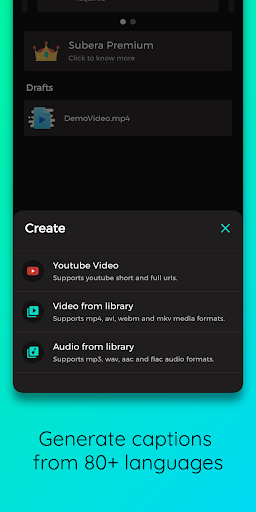
- Generate captions/subtitles automatically for your videos & audio files
- Generate captions/subtitles for Youtube Videos by pasting the link or just sharing from Youtube App
- Generate captions/subtitles for video files for up to 60 minutes.
- Generate captions/subtitles for Instagram Reels, TikTok, MX TakaTak and YouTube Shorts and many others.
🎬 Caption/Subtitle Editor
Subera Editor is designed to maximize your productivity
- Transcription & Captions Modes
- Editor & Preview Modes
- Merge two segments, Split a segment into two or Bulk shift segments in the timeline in a few clicks
- Just click the forward or backward button to switch between the segments.
- Drag and Resize to adjust segment start and end times.
- Tap on the segment to replay the segment
- And lots more, Install today
🎥 Export Video
- Quick export video with burnt subtitles (Open Captions).
- Change the font, background, colour & position of captions on the video.
- Add personal text or image watermark to your videos
- Quick Preview of configuration by a 5-second demo video
💾 Export File
- Quick export to various formats like SRT, VTT, SUB, DFXP & TXT
- Just export and upload to your youtube channel.
- Upload to a video editor or video player.
💰 Pricing
Simple Pay as you go credits & monthly subscription plans
🙈 Quality Disclaimer
The quality of the captions varies due to various factors. Subera may generate poor quality captions in case of video has loud background music and background noise. Vocals, Pronunciations & Punctuations are not proper, or multiple languages are spoken in the video.
Any questions for Subera
Please contact us via androi