Cute Note Widget

Cute Note Widget Summary
Cute Note Widget is a ad-supported Android app in Personalization by chlorocube. Released in Jan 2023 (3 years ago). It has about 44.5K+ installs and 603 ratings with a 4.67★ (excellent) average. Based on AppGoblin estimates, it reaches roughly 885 monthly active users and generates around $<10K monthly revenue (0% IAP / 100% ads). Store metadata: updated Nov 21, 2025, version 24120618.
Recent activity: 271 installs this week (1.2K over 4 weeks) showing below average growth View trends →
Data tracking: SDKs and third-party integrations were last analyzed on Jun 14, 2026. The app's network data flows (API traffic to/from the app and its SDKs) were last crawled on Sep 29, 2025.
Store info: Last updated on Google Play on Nov 21, 2025 (version 24120618).
SDKs, Trackers & Permissions
Cute Note Widget was last scanned for SDKs 2026-06-14. Below is the overview of third party companies detected in the app. The full list of raw SDKs, app permissions and unknown SDKs is available here.
 Firebase
 Google
 Bumptech
 AdMob
AdMobApp Details
App Store
Ads & App-Ads.txt
AppGoblin SDK Scans
4.67★
Ratings: 603
Screenshots


App Description
A sticky note widget with a simple, cute and easy-to-read design.
This is a note widget that can be placed on your home screen.
A sophisticated, pretty, and easy-to-read design.
What you can customize:
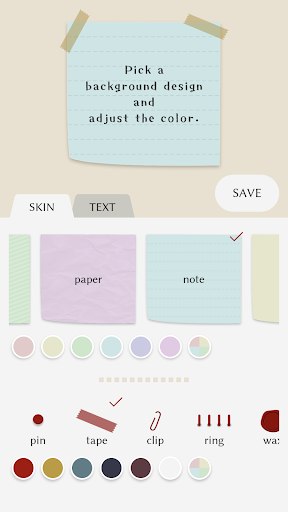
- Change the background design and color
- Adjust the text font, size and color
- Adjust the line spacing and padding of the text
- Add multiple note widgets to your home screen
- Resize the note widgets on your home screen
- Register up to 5 colors of your choice (for both background design color and text color)
- Duplicate a note
To place a note widget on your home screen:
Please follow the steps below:
https://support.google.com/android/answer/9450271?hl=en
To edit the contents of a note:
Method 1: Tap the note widget on your home screen to open the edit screen.
Method 2: Open the CuteNoteWidget app and tap the note from the list to open the edit screen.
To duplicate a note:
You can only duplicate data from an existing note when creating a new note widget.
1. Tap the red database icon at the upper-right corner of the edit screen.
2. Tap the note from the list to duplicate it.
Languages currently supported:
English, Japanese
(*) This app includes fonts that support the Japanese language.