楽天銀行 -個人のお客様向けアプリ


楽天銀行 -個人のお客様向けアプリ Summary
楽天銀行 -個人のお客様向けアプリ is a ad-supported Android app in Finance by 楽天銀行株式会社. It has about 7.3M+ installs and 226.6K ratings with a 4.37★ (good) average. Based on AppGoblin estimates, it reaches roughly 784.1K monthly active users and generates around $10K+ monthly revenue (0% IAP / 100% ads). Store metadata: updated Mar 12, 2026, version 1861.
Recent activity: 179.3K installs this week (307K over 4 weeks) showing exceptional growth , and 614 new ratings this week View trends →
Data tracking: SDKs and third-party integrations were last analyzed on Mar 28, 2026. The app's network data flows (API traffic to/from the app and its SDKs) were last crawled on Feb 13, 2026.
Store info: Last updated on Google Play on Mar 12, 2026 (version 1861).
楽天銀行 -個人のお客様向けアプリ was last scanned for SDKs 2026-03-28. Below is the overview of third party companies detected in the app. The full list of raw SDKs, app permissions and unknown SDKs is available here.
 JourneyApps
 Kotlin
 Square
 Jake Wharton
 Rakuten
 Facebook
 Google
 Firebase
4.37★
Ratings: 226.6K
Screenshots



App Description
Transfer and balance inquiry from the app is also easy to operate!
*This app is a smartphone app for Rakuten Bank individual customers.
It cannot be used with personal business accounts or corporate business accounts.
This is a smartphone app provided by Rakuten Bank, one of Japan's largest internet banks.
You can use the app 24 hours a day, anywhere, to process transfers, view deposit and withdrawal statements, and check your balance.
Submitting the documents required for account opening is also faster when sent through the app than by mail.
Rakuten Bank will continue to strive to make its online banking experience easier to use.
We appreciate your continued patronage.
-------------------------
◆Main Features◆
-------------------------
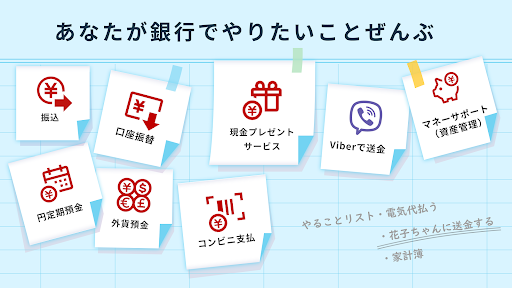
●Transfers & Payments
-In addition to regular transfers, you can also manage scheduled transfers through the app.
-Using Easy Transfer (Mail Money), Transfer via Viber, and Transfer via Facebook, you can send money without knowing the recipient's account information.
●Smartphone ATM Deposits & Withdrawals
-You can deposit and withdraw funds using smartphone ATMs at Seven Bank and Lawson Bank.
● Transaction Details Inquiry
- View your deposit and transfer history, account balance, and more all in one place from your "Transaction Details" page.
● Regular Deposits
- We offer preferential interest rates (preferential and bonus rates) based on your usage.
● Term Deposits (Regular Term Deposits, Rakuten Extension Deposits, etc.)
- Make deposits into term deposits and Rakuten Extension Deposits (structured deposits), and check your deposit amount and interest rate.
- Rakuten Extension Deposits are yen term deposits with special provisions that extend the deposit period from one year to up to 10 years. They offer more favorable interest rates than standard yen term deposits.
● Foreign Currency Deposits
- Open a foreign currency account and conduct foreign currency regular and term deposit transactions.
- Market-linked exchange rates allow for real-time trading 24/7!
● Money Support (Asset Management Tool)
- Rakuten Bank's free household accounting service. It compiles and categorizes card, bank, securities, and loan statements and asset balances, automatically creating a household accounting book. It supports your asset management.
- Compatible with most major domestic financial institutions, including banks, securities companies, and credit card companies.
- Recommended for those who want to save but are not good at keeping a household budget!
● New Rakuten Bank FX
- Open an FX account and make deposits and withdrawals directly from the app.
● International Remittances and Foreign Currency Remittances
- A service that allows you to receive international and foreign currency remittances into your Rakuten Bank account.
● Recommend to a Friend
- A feature that allows you to easily recommend Rakuten Bank to family and friends through the app.
● Easy Split-the-Bill
- A service that makes it easy for the organizer to split the bill for events like drinking parties and trips with friends.
● Rakuten Bank Convenience Store Payment
- Rakuten Bank Convenience Store Payment is a convenient service that allows you to make payments from your Rakuten Bank account without going to a convenience store by simply scanning the barcode on your convenience store payment slip.
● ATM Search
- Using your smartphone's GPS function, you can search by address or station name, and even get directions to an ATM.
● Submitting ID Documents and Certificates
- Easily submit documents such as ID verification and certificates required for opening a Rakuten Bank account or applying for a loan from the app.
* Other service functions may require logging in to the Rakuten Bank website.
[About Logging In Using Biometric Authentication (Biometric Authentication Feature Provided by Google)]
This feature allows you to log in to the Rakuten Bank app without entering a password by registering your biometric information on your smartphone.
* Please enable biometric authentication in the Rakuten Bank app settings (after logging in) before use.
* Biometric information used for biometric authentication can be added or deleted in the device settings.
■ Biometric Authentication-Compatible OS and Devices
- Fingerprint authentication is available on models with Android OS 6.0 or later that support fingerprint authentication.
- Other biometric authentication is available on models with Android OS 9.0 or later that support biometric authentication.
Please note that depending on your smartphone model, authentication functions, screen display, and other features may be limited.
[Introduction to Smartphone (Rakuten Bank App) Services and Features]
https://www.rakuten-bank.co.jp/nonpc/
[Recommended Environment]
https://www.rakuten-bank.co.jp/nonpc/#anchor-13
[Note]
- If you have changed your smartphone model or updated your OS, you will need your user ID and login password. Please prepare them in advance.
- Before using the app, please check the Rakuten Bank website for operating instructions and important information.