Scale Ruler - various scales

Scale Ruler - various scales Summary
Scale Ruler - various scales is a ad-supported Android app in Productivity by mapp2014. Released in Sep 2016 (9 years ago). It has about 71.6K+ installs Based on AppGoblin estimates, it reaches roughly 3.1K monthly active users and generates around $<10K monthly revenue (0% IAP / 100% ads). Store metadata: updated Jul 24, 2024.
Recent activity: 40 installs this week (185 over 4 weeks) showing below average growth View trends →
Store info: Last updated on Google Play on Jul 24, 2024 .
3.93★
Ratings: 0
Screenshots

App Description
Display standard scale and various scales.
Scale Ruler is the simple application to display the scale of various measurement units.
※ Warning: The accuracy of the scales cannot be guaranteed.
Please be sure the calibration.
How to use:
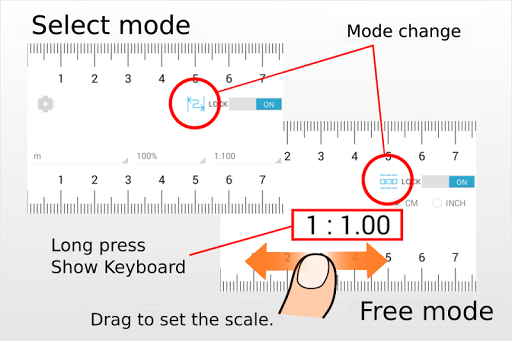
There are two modes.
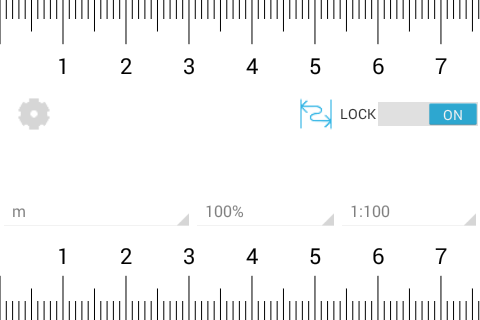
- Select mode:
In UNLOCKED state, after choosing measurement unit, magnification ratio and reduced scale, the scale is displayed.
You can lock the scale on the ruler with a switch.
- Free mode:
In UNLOCKED state, and freely set the scale by dragging the screen to the left or right.
The setting range is from 1: 1 to 1: 100.
When you press and hold the scale value, the keyboard is displayed and you can enter the scale.
You can lock the scale on the ruler with a switch.
※Sorry for the advertisement during unlocking.
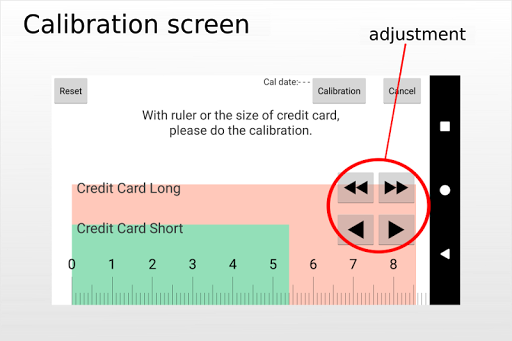
- Calibration
As scale is displayed correctly, ruler, using the size of a credit card, please do the calibration.
(Please use a ruler as much as possible.)
After calibration, please tap the "calibration" button.
Calibration results are saved.
"Reset" button : the display of the scale to the initial state. Save is not.
"Cancel" button : without saving the calibration results, and exit the calibration.
Specification of Scale Ruler
- measure length
meter,inches
- magnification ratio
50% , 70.7% , 100% , 141% , 200%
- reduced scale
for meter
1:100 , 1:150 , 1:200 , 1:250 , 1:300 , 1:400 , 1:500 , 1:600
for inch
1:1 , 1:1.5 , 1:2 , 1:2.5 , 1:3 , 1:4 , 1:5 , 1:6
for inch(Architectural)
1:1 , 1:2 , 1:4 , 1:8 , 1:12 , 1:16 , 1:24 , 1:32 , 1:48 , 1:64
1:96 , 1:128 , 1:192 , 1:384
for inch(Engineering)
1:120 , 1:240 , 1:360 , 1:480 , 1:600 , 1:720
1:800 , 1:960 , 1:1080