MusicPlayer LMZa made in Japan


MusicPlayer LMZa made in Japan Summary
MusicPlayer LMZa made in Japan is a ad-supported Android app in Music And Audio by LMZa Studio. Released in Mar 2018 (8 years ago). It has about 4.6K+ installs Based on AppGoblin estimates, it reaches roughly 215 monthly active users and generates around $<10K monthly revenue (0% IAP / 100% ads). Store metadata: updated Feb 26, 2026.
Recent activity: 8.00 installs this week (31 over 4 weeks) showing steady growth View trends →
Store info: Last updated on Google Play on Feb 26, 2026 .
0★
Ratings: 0
Screenshots

App Description
High Speed&Quality MusicPlayer. Cool UI & Multi Functional & High-Customizable
Offline music player application to enjoy music in the smartphone.
This is trial Version.
Normal Version is here.
Please watch the promotion video!
· Play with easy one hand operation
· Select by artist, album, genre Play
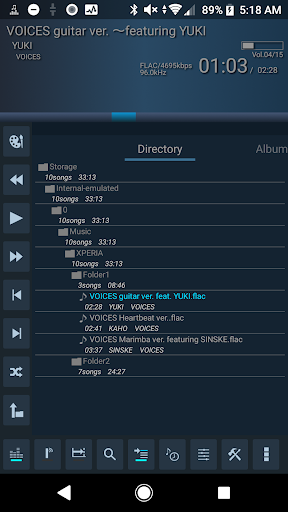
· Folder (directory) playback
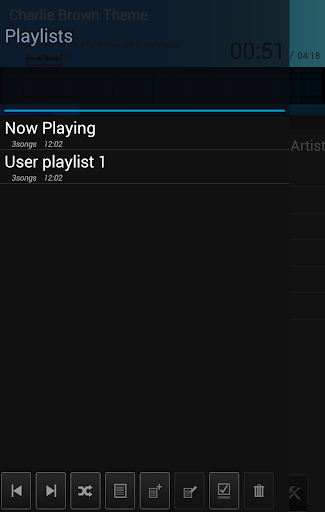
· Make playlists
· Lightweight power saving design ideal for background music playback
· Continuous playback, Shuffle continuous playback
· Digest play. Join a part of the songs naturally like dicography.
· Playback history.
· Multiple Queue List.(Max30)
· Sleep / Alarm Timer
· Android 7.0-16.0
· Gapless Playback
· Replay Gain
· Bluetooth remote controller support.
· High-Resolution sound source support(*)
· mp3, aac, Apple lossless, m4a, ogg, aac, flac, mid, mdx, etc. (*)
* Depends on the file that the smartphone supports.
· Album art display.
· Lyrics (need LRC file)
· KeyShift/Speed changer
· Multi track
· Popup movie playback,
· Full-Screen movie playback.
· Android Auto
· Bluetooth Audio(BTA)
· MDX(RetroPC's sound file) playback
【Intuitive selection of songs without setting required】
We emphasize simplicity and lightweight operability specialized for selecting and playing songs, eliminating visual functions such as artwork.
You can play songs of built-in storage and external store (SD card).
【Playback mode optimum for background music】
Continuous playback, shuffle continuous playback, digest playback function to play songs from the middle for a fixed time.
In the digest, the songs are cut with a fade in & fade out, and it operates as an option of continuous performance and shuffle continuous performance.
With the performance that changes one after another from the middle of the song, you can enjoy music that has a feeling of tired everyday in a different way from usual.
[Power saving design]
This application is developed with the goal of listening to music in the background, not handling multimedia information other than music, and power-saving and nimble operation.
The display of artwork and elaborate visuals consumes important smartphone batteries and can be hidden as an option.
【Remote control function】
Corresponds to the Bluetooth remote control, it is possible to adjust the volume, play / stop, next / previous song, fast forward / rewind (long press) with the remote control even while locking.
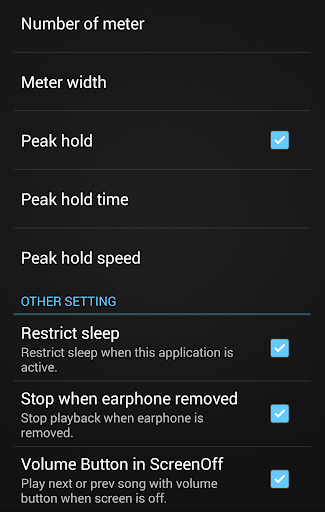
Optionally you can use the smartphone volume button for the next / previous song.
【Playback control while using other applications】
A semitransparent small floating controller is displayed on the screen and you can play / stop, next / previous song, fast forward / rewind.
You can display this application with the back button of the floating controller and quickly return to the original application with the Android back button. The controller can also move to any position.
【Interface that can be used with one hand】
It is designed to be operable with one hand from song selection to performance.
The buttons are arranged vertically at the left end and the song selection method (album, artist, genre, folder) is switched with tab swipe. (Tab name selection is also acceptable)
[Visualizer installed]
Equipped with a visualizer that moves smoothly according to songs. You can customize appearance and behavior.
It is optimized to operate with power saving, but it can be turned OFF if battery consumption is anxious.
Since the internal processing is stopped when the display is off or inactive, the power saving operation is the same as when it is not displayed.
【Graphic Equalizer】
Equipped with 5 band equalizer (It depends on model)
Select from preset, custom setting is possible.
【privacy policy】
This application uses the recording function for the implementation of the visualizer (a visual function that works according to music).