Designer Tools Pro


Designer Tools Pro Summary
Designer Tools Pro is a ad-supported, with in-app purchases Android app in Tools by Wixel Store. Released in Jan 2020 (6 years ago). It has about 13.4M+ installs and 14.6K ratings with a 3.99★ (average) average. Based on AppGoblin estimates, it reaches roughly 1.8M monthly active users and generates around $100K+ monthly revenue (41% IAP / 59% ads). Store metadata: updated Oct 23, 2025, version 46.
Recent activity: 139.5K installs this week (338.7K over 4 weeks) showing steady growth , and 107 new ratings this week View trends →
Data tracking: SDKs and third-party integrations were last analyzed on Jun 19, 2026. The app's network data flows (API traffic to/from the app and its SDKs) were last crawled on Dec 23, 2025.
Store info: Last updated on Google Play on Oct 23, 2025 (version 46).
SDKs, Trackers & Permissions
Designer Tools Pro was last scanned for SDKs 2026-06-19. Below is the overview of third party companies detected in the app. The full list of raw SDKs, app permissions and unknown SDKs is available here.
 Square
 Kotlin
 Bumptech
 Google
 AdMob
AdMob Firebase
App Details
App Store
Ads & App-Ads.txt
AppGoblin SDK Scans
3.99★
Ratings: 14.6K
Screenshots



App Description
Mockup and Background for WhatsApp, Facebook, Messenger
Designer Tools Pro provides a suite of features to review and validate app specifications. Whether it be checking your keylines or that shade of blue, you’ll definitely want to add this app to your toolkit. Even if you provide redlines, these are a great way to verify each and every pixel.
Grid Overlay - Quickly toggle on-screen grids to check layouts for inconsistent spacing or mis-aligned elements. You can even customize the grid size, grid line and keyline colors.
Mockup Overlay - Display a mockup image over your app. This gives you a high-fidelity opportunity to see how the design spec matches the developed user interface. Choose from portrait or landscape overlays and tune the opacity for an effective comparison. You can also adjust vertical position on mockup image
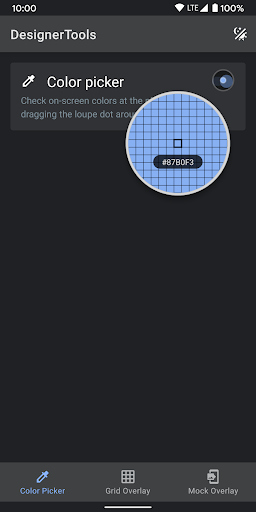
Color Picker - Use your finger to drag around a loupe magnifier and identity the hex codes of colors at the pixel level you can also tap on hex text to copy it into clipboard.
Disclosure:
The app uses the AccessibilityService API to display a floating popup to enable multitasking.
No data is collected or shared using the AccessibilityService API!