Daily Schedule - Timetable


Daily Schedule - Timetable Summary
Daily Schedule - Timetable is a ad-supported, with in-app purchases Android app in Productivity by FamApp3. Released in Apr 2020 (5 years ago). It has about 983.7K+ installs and 2.4K ratings with a 3.76★ (average) average. Based on AppGoblin estimates, it reaches roughly 45.3K monthly active users and generates around $<10K monthly revenue (43% IAP / 57% ads). Store metadata: updated Mar 22, 2026, version 3219.
Recent activity: 11.2K installs this week (17.7K over 4 weeks) showing exceptional growth , and 2.00 new ratings this week View trends →
Data tracking: SDKs and third-party integrations were last analyzed on Mar 12, 2026. The app's network data flows (API traffic to/from the app and its SDKs) were last crawled on Mar 4, 2026.
Store info: Last updated on Google Play on Mar 22, 2026 (version 3219).
Daily Schedule - Timetable was last scanned for SDKs 2026-03-12. Below is the overview of third party companies detected in the app. The full list of raw SDKs, app permissions and unknown SDKs is available here.
 JetBrains
 Square
 Google
 Unity
Unity Pangle
 AppLovin
 AdMob
AdMob Firebase
3.76★
Ratings: 2.4K
Screenshots

App Description
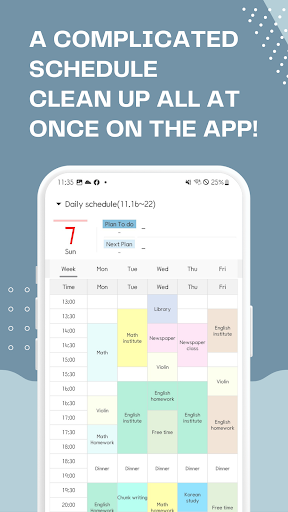
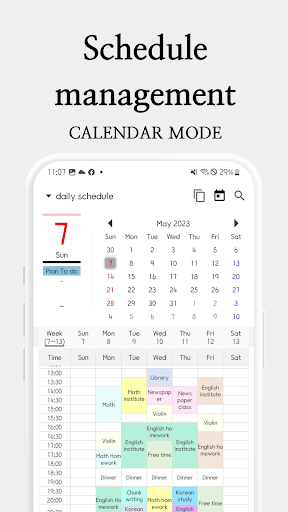
Weekly timetable + planner. Multi-planner, widgets, PDF support.
★ The best schedule planner app to show your weekly timetable!
★ Create and manage multiple planners, timetables, and widgets simultaneously!
★ The only timetable app that lets you plan your time daily until dawn the next day.
○ Check your schedule instantly with various types of widgets - daily/weekly/monthly.
○ A simple schedule app that allows easy schedule entries and multiple copies (planned, one-day, one-week).
○ File sharing through PDF conversion and timetable printing app.
○ Best planner app for accurate time management with alarm settings.
[Main functions]
1. Create planners, schedule planners, and timetables
- Create multiple planners and timetables as needed.
- Copy existing planners and timetables and modify only the necessary parts.
- Choose your daily schedule until 12:00 p.m. the next day.
2. Plan your time
- Set plans, colors, notes, and notifications on the 'Choose Time First' pop-up screen.
- Freely increase and decrease time with the ↓↑ X button.
- Undo and redo functions to modify the schedule without any burden.
- Check completed schedules with the Complete checkbox.
3. Copy plans
- Click the 'Copy' button to copy plans to different days or times.
- Full copies of daily and weekly schedules are also available.
4. Alarm function
- Vibration settings and various alarm sound settings.
5. Memo function
- Manage important tasks separately by taking notes.
6. View weekly plans
- Select the Week tab to view the weekly schedule.
- Adjust the font size as desired.
7. Home screen multi-widget
- Display multiple timetables as widgets.
→ Study schedule planner, child schedule planner, work schedule planner, etc.
- Daily schedule, weekly schedule, monthly schedule, memo widget.
8. PDF output features
- Convert created timetables to PDF files.
- Provide a blank timetable without a created plan.
- Print immediately when wireless printing is connected.
9. Google e-mail ID authentication-based planner backup, restore, and share
- Full planner backup and restore → Keep data even when changing devices.
- Planner sharing → Transfer and download planners.
10. Various settings
- App theme: Classic Theme / Simple Theme.
- Available in 4 fonts.
- Day of the week display order: Select Monday → Day and Day → Day of the week.
- Select the day of the week: Monday to Sunday, Monday to Friday, etc.
- Notification settings: vibration, alarm sound selection, etc.
- Week widget display settings: interval, collection, etc.