Spiral Photo & Video Editor


Spiral Photo & Video Editor Summary
Spiral Photo & Video Editor is a ad-supported Android app in Beauty by MAA FOR APPS. Released in Feb 2022 (4 years ago). It has about 623.7K+ installs and 3.8K ratings with a 4.57★ (excellent) average. Based on AppGoblin estimates, it reaches roughly 17.7K monthly active users and generates around $<10K monthly revenue (0% IAP / 100% ads). Store metadata: updated May 22, 2026, version 50.
Recent activity: 1.8K installs this week (3.4K over 4 weeks) showing steady growth , and 8.00 new ratings this week View trends →
Data tracking: SDKs and third-party integrations were last analyzed on May 8, 2026.
Store info: Last updated on Google Play on May 22, 2026 (version 50).
SDKs, Trackers & Permissions
Spiral Photo & Video Editor was last scanned for SDKs 2026-05-08. Below is the overview of third party companies detected in the app. The full list of raw SDKs, app permissions and unknown SDKs is available here.
AppGoblin saw Spiral Photo & Video Editor uses 2 Development Tools
 Google
 Bumptech
AppGoblin saw Spiral Photo & Video Editor uses 4 Ad Networks
 Facebook
 Unity
Unity ironSource
AppGoblin saw Spiral Photo & Video Editor uses 2 Mediation
 AdMob
AdMobAppGoblin saw Spiral Photo & Video Editor uses 1 Analytics: Product
 Firebase
App Details
App Store
Ads & App-Ads.txt
AppGoblin SDK Scans
4.57★
Ratings: 3.8K
Screenshots


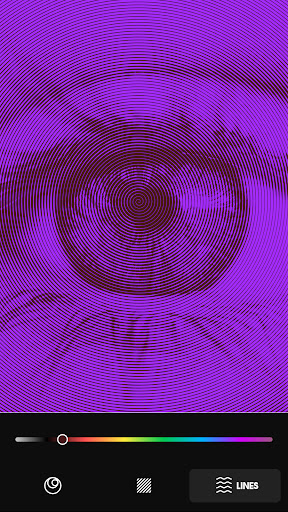
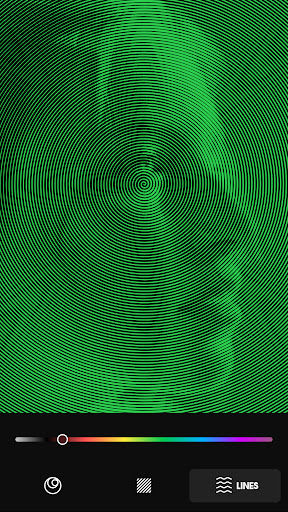
App Description
Spiral art photo & video editor lets you spiralize your picture and make it cool
Spiral art photo editor is a simple and easy-to-use app that lets you turn your images into a spiral art masterpiece, yes, you can convert your simple photo to spiral art artwork.
Spiral art video editor let you turn your video into spiral artworks, with few clicks you can make your boring video looks amazing with spiral art effect.
The spiral art photo editor app provides too many features to let you edit your spiralize your photos and make them cool and like illusions.
Spiral art photo editor app provides the following features :
- Spiral art size, you can change the size of the spirals circles as you like, make it tinier or thicker, you have the choice.
- Spiral art lines color, you can change the color of the spiral line as you like.
- Spiral art background color, in addition to spiral art lines color changer feature, our app lets you change the background of your spiral art photo.
- Swap colors, you can swap between the spiral art lines and spiral art background colors as you like, with one click.
How to use spiral art photo editor :
- Open the spiral art app.
- Click on the import image button and select a picture from your gallery.
- Once you've selected the picture, the spiral art app will automatically create a spiral art artwork from your photo.
- You've always had the option to change the spiral art lines size, spiral art background, and lines color.
- Once you fill finished editing your photo, hit the export button and the spiral art app will automatically save the edited picture into your device's gallery.
What spiral art photo editor offers:
Spiral art photo editor app gives you the possibility to turn your picture into an aesthetic and vaporwave spiral art artwork, yes, with just a few clicks, here and there, you can make your image looks cool and beautiful.
Spiral art photo editor app made by the same developer who made vaporgram, vaporwave wallpapers, retrowave wallpapers as well as runaway aurora photo editor and more aesthetic apps, spiral art photo editor have a beautiful, eyes-caring and initiative user interface to let you edit your photos in a comfortable condition.
What are you waiting for, use our app spiral art photo editor, and create your own illusion photos.
The spiral art photo editor will support the video very soon, yes, you will be able to turn your videos into spiral art video artwork