ADS-B Radar (RTL-SDR)


ADS-B Radar (RTL-SDR) Summary
ADS-B Radar (RTL-SDR) is a free, ad-supported, with in-app purchases Android app in Communication by Knowle Consultants. Released in Feb 2022 (4 years ago). It has about 48K+ installs and 156 ratings with a 4.57★ (excellent) average. Based on AppGoblin estimates, it reaches roughly 2.1K monthly active users and generates around $<10K monthly revenue (39% IAP / 61% ads). Store last updated Aug 9, 2026
Recent activity: 207 installs this week (746 over 4 weeks) showing below average growth View trends →
SDK intelligence: AppGoblin detected 5 development tools(e.g. Google), 1 ad networks, 1 mediation,and 1 analytics: product integrated into ADS-B Radar (RTL-SDR). View full SDK list →
ADS-B Radar (RTL-SDR) SDKs Summary
ADS-B Radar (RTL-SDR) was last scanned for SDKs on 2026-07-16. Below is the overview of third-party companies detected in the app. The full list of SDKs, permissions and unknowns is available here.
 Google
 Kotlin
 JetBrains
 AdMob
AdMob Firebase
4.57★
Ratings: 156
Screenshots


App Description
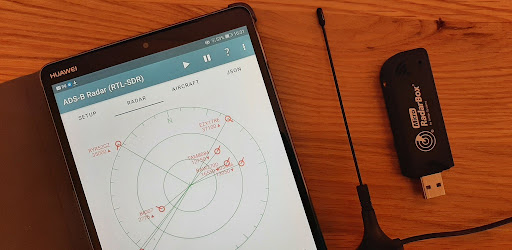
Track aircraft by receiving live ADS-B data using an RTL-SDR USB dongle.
*** Disclaimer ***
This application is intended for use by hobbyists interested in tracking aircraft in their local area. It has not undergone formal testing or verification and as such the application and/or the data it presents must not be used in any safety critical situations. If you do so it will be entirely at your own risk. We make no guarantees or warranties of any kind, expressed or implied.
*** Announcement ***
We're proud to announce the release of our new SDR application called Spectrum SDR - you might want to give it a try some time.
Introduction
This application is about having a bit of fun with those amazing little RTL-SDR dongles, whilst tracking aircraft in your local area. It's nice and easy to use so why not give it a try?
Before using the application, please read the Disclaimer above, and always remember that the application must not be used in any situations where the accuracy of the data is critical to the safety of either individuals or property.
There are two ways to use the application. The first is to use an RTL-SDR dongle and an SDR driver, available from Google Play. Selecting the Driver option in the application menu will open the driver page on Google Play. The second way is to connect to an instance of rtl_tcp running on a remote computer, possibly over WiFi. You will need a good network connection for this to work reliably so use of the driver is probably the preferred way to use the application in most cases.
The application can receive ADS-B messages on either 1090 MHz or 978 MHz.
We hope you enjoy using this application.