しゃべるアラーム (Talking Alarm Clock)


しゃべるアラーム (Talking Alarm Clock) Summary
しゃべるアラーム (Talking Alarm Clock) is a ad-supported Android app in Lifestyle by East-Hino. It has about 21.5K+ installs Based on AppGoblin estimates, it reaches roughly 1.4K monthly active users and generates around $<10K monthly revenue (0% IAP / 100% ads). Store metadata: updated Mar 25, 2026.
Recent activity: 544 installs this week (640 over 4 weeks) showing exceptional growth View trends →
Store info: Last updated on Google Play on Mar 25, 2026 .
0★
Ratings: 0
Screenshots

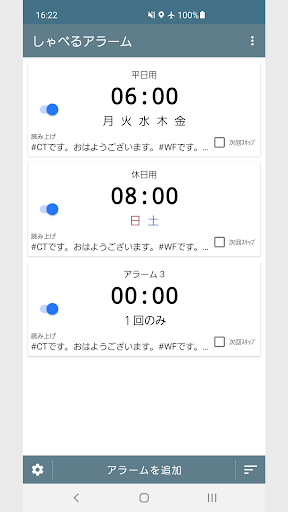
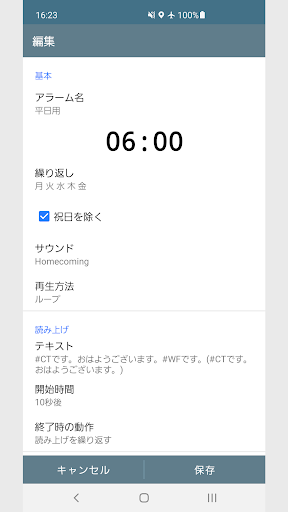
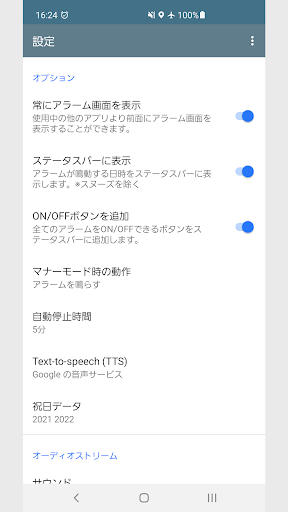
App Description
The talking alarm is an alarm clock that uses Text-to-speech (TTS).
This app has basic alarm functions, such as repeating by time or day of the week, holiday support, and a snooze setting.
The app's greatest feature is that it uses Text-to-speech (TTS) to read the set text aloud when the alarm goes off.
You can easily set the text using formatting symbols.
For example...
If you set the alarm name to
"Medicine"
the time to
"6:30 PM"
the read-aloud text to
"It's #CT. It's time for #AN."
It will read out "It's 6:30 PM. It's time for medicine."
■ Usable Formatting Symbols
#AN Alarm Name
#AT Alarm Time
#CD Current Date and Time
#CT Current Time
#ND Today's Date
#NW Today's Day of the Week
#NS Today's Rokuyo
#BL Battery Level
#WF Weather Forecast
#WC Weather Overview
#SD Today's Schedule
#ST Tomorrow's Schedule
#MC Notification Content
#H1-5 HTML Analysis
( ) When Acquisition Failed
*If information acquisition fails, such as when offline, the contents in ( ) will be read aloud.
■ About What Happens When Reading Ends
Selecting "Stop Alarm (No Screen Display)" will start reading in the background without displaying the alarm screen.
Select this if you want to create a time-based alarm.
■ About the Weather Forecast (#WF, #WC)
Bottom-left Settings > Weather Forecast
You can change the region.
*Data from the Japan Meteorological Agency is used.
https://xml.kishou.go.jp/xmlpull.html
■ About Schedules (#SD, #ST)
Settings button in the bottom left > Schedule
Select the calendar from which to retrieve schedules.
■ About Notification Content (#MC)
You must allow access to notifications.
Settings button in the bottom left > Required Permissions and Services
■ About HTML Analysis (#H1-5)
Settings button in the bottom left > HTML Analysis
Enter the URL of the site you want to retrieve information from.
For Select, Index, and Attribute settings, you must check the source code of the target site.
Open the target site in Chrome and add "view-source:" to the beginning of the URL to view the source code.
The default values for Select, Index, and Attribute are:
Select → p[class=text]
Index → 0
Attribute → Not specified (empty string)
This retrieves the content of this portion of the HTML source.
<p class="text">Contents here >
Get an element with Select
Index specifies the element number to retrieve if multiple elements are found (starting from 0).
Attribute refers to content or alt. If not specified, the text within the element will be retrieved.
For example...
If there are multiple elements with the same name
Select → div[class=yftn12a-md48]
Index → 1
Attribute → Not specified (empty string)
Set the following.
■ About TTS
Uses Japanese-compatible Text-to-speech (TTS).
If you don't have it installed, download it from the Play Store.
■ Alarms that repeat every few days
Specify a "day interval" for date-specified alarms.
You can create alarms that repeat every 2 to 10 days.
■ About Usage Permissions
This app uses the following permissions to provide various services. Personal information will not be sent outside the app or provided to third parties.
・Notification Sending
Notifications are used to notify you when an alarm is ringing.
・Notification Access
Required when reading notification content.
・Music and Audio Access
Required when playing audio files stored in storage.
- Reading calendar events and information
Required when reading out events.
■ Important Notice
Please note that we are not responsible for any problems or damage caused by this app.
We regret to inform you that we have discontinued support for 32-bit Android devices.
We apologize for any inconvenience caused to customers using these devices, and appreciate your understanding.
This app is an alarm tool designed for time management in everyday life and at work.