Useful Zoom V-Player


Useful Zoom V-Player Summary
Useful Zoom V-Player is a ad-supported Android app in Video Players by katapu.net. Released in Dec 2023 (2 years ago). It has about 14.1K+ installs Based on AppGoblin estimates, it reaches roughly 1.6K monthly active users and generates around $<10K monthly revenue (0% IAP / 100% ads). Store metadata: updated Mar 22, 2026.
Recent activity: 142 installs this week (514 over 4 weeks) showing steady growth View trends →
Store info: Last updated on Google Play on Mar 22, 2026 .
4★
Ratings: 0
Screenshots


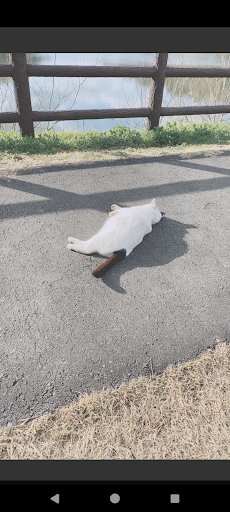
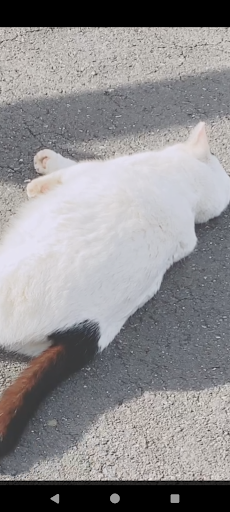
App Description
A video player that lets you zoom in and out easily.
A handy video player that lets you easily zoom in and out on the screen is here!
Have you ever wanted to play a video while zooming in on just one part of it?
This player is designed specifically for screen zooming
without requiring any complicated controls.
You may not need it very often,
but when you do, please give it a try.
*This app does not have a login/authentication feature and does not provide video content. Please select a video file stored on your device from the file picker and play it, or select a video file from a file manager app and open it with this app.
It uses the highly regarded LibVLC as its video playback engine.
So of course, it also works very well
as an everyday video player.
It is free, so feel free to try it.
[Operation Instructions]
○ Touch Control
When controller is hidden: Move screen: Swipe
Select execution: Single tap
Zoom in/out: Two-finger gesture.
Play/Pause: Tap play/pause button on the controller
Fast forward: Tap fast forward button on the controller
Rewind: Tap rewind button on the controller
Show controller: Single tap the screen (when controller is hidden)
Hide controller: Single tap an empty area of the screen (when controller is visible)
Zoom in: Double tap
Zoom out: Long press
Exit (when controller is hidden) | Hide controller (when visible): Tap the "BACK" button
○ Remote Control
When controller is hidden: Move screen | When controller is visible: Directional control: [Directional buttons]
Show controller (single press)/Zoom in (double press)/Zoom out (long press) | When controller is visible: Execute selection: ["CENTER" button]
Play/Pause: ["MEDIA_PLAY_PAUSE" button]
Play: ["MEDIA_PLAY" button]
Pause: ["MEDIA_PAUSE" key] ["MEDIA_STOP" key]
Fast forward: ["MEDIA_FAST_FORWARD" button] ["MEDIA_SKIP_FORWARD" button] ["MEDIA_STEP_FORWARD" button]
Rewind: ["MEDIA_SKIP_BACKWARD" button] ["MEDIA_STEP_BACKWARD" button]
Show controller: (when hidden) ["CENTER" button]
Hide controller: (when visible) ["BACK" button]
Zoom in: Double press ["CENTER" button]
Zoom out: Long press ["CENTER" button]
Exit (when controller is hidden) | Hide controller (when visible): ["BACK" button]
○ Gamepad Control
When controller is hidden: Move screen | When controller is visible: Directional control: [Cursor buttons]
Show controller (single press)/Zoom in (double press)/Zoom out (long press) | When controller is visible: Execute selection: ["A" button]
Play/Pause: ["START" button] ["SELECT" button]
Fast forward: ["R1" button]
Rewind: ["L1" button]
Show controller: ["L2" button]
Hide controller: ["R2" button]
Zoom in: ["X" button]
Zoom out: ["Y" button]
Exit (when controller is hidden) | Hide controller (when visible): ["B" button]
○ Hard Key Control
When controller is hidden: Move screen | When controller is visible: Directional control: [Cursor keys] / Up ["E" key] ["8" key] / Down ["C" key] ["2" key] / Left ["S" key] ["4" key] / Right ["F" key] ["6" key]
Show controller (single press)/Zoom in (double press)/Zoom out (long press) | When controller is visible: Execute selection: ["ENTER" key] ["SPACE" key] ["D" key] ["5" key]
Play/Pause: ["R" key] ["0" key]
Play: ["T" key]
Pause: ["G" key]
Fast forward: ["V" key] ["3" key]
Rewind: ["X" key] ["1" key]
Show controller: ["Q" key] ["/" key] ["#" key]
Hide controller: ["W" key] ["*" key]
Zoom in: ["A" key] ["+" key] ["9" key]
Zoom out: ["Z" key] ["-" key] ["7" key]
Exit (when controller is hidden) | Hide controller (when visible): ["ESCAPE" key] ["." key]