TSplus Remote Support


TSplus Remote Support Summary
TSplus Remote Support is a mobile Android app in Tools by TSplus. Released in Nov 2024 (1 year ago). It has about 1.8K+ installs Based on AppGoblin estimates, it reaches roughly 177 monthly active users . Store metadata: updated Jan 13, 2026.
Recent activity: 53 installs this week (176 over 4 weeks) showing steady growth View trends →
Store info: Last updated on Google Play on Jan 13, 2026 .
0★
Ratings: 0
Screenshots


App Description
Remote Desktop Control and Screen Sharing
The Best Alternative to TeamViewer for Remote Desktop control and Screen Sharing. Provide instant Attended or Unattended Remote Assistance to your teams or clients anywhere, at any time.
- Remote Control :
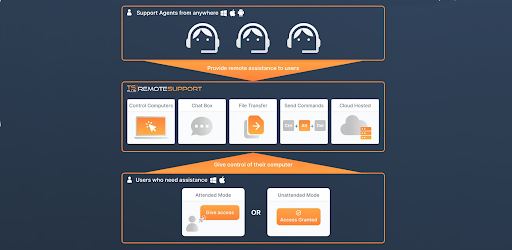
Agent can take control of the screen, mouse, and keyboard of remote clients. With a single click, the end-user can grant permission for the agent to take control. Once the connection is approved, the chat box opens, initiating the remote support session.
- Screen Sharing :
Agent can share the screen of its android device. It allows you to remote control your android device by using the Android system's "AccessibilityService" interface without collecting any data.
- Multi-agent Support Session :
An Agent can take control and troubleshoot independently or collaboratively: multiple Agents can connect to the same remote computer.
- Chat Box :
Both the agent and the end-user have a tailored chat box. The agent’s chat box contains vital information and all the standard functionalities he will need to run the session.
The end-user chat box is simpler for an ideal user experience. It contains key functionalities such as file sharing.
- Language :
The agent can easily change the language of the remote support interface.
- Send Commands :
Support Agents can send keyboard commands such as ctrl+alt+del or start the Task Manager on remote computers.
Multi-monitor Support
Support agents have access to all displays on a remote computer using a multi-monitor configuration.
- Remote Computer Information :
Agents can view OS, Hardware and User Account data from the Remote PC.