Business Calendar


Business Calendar Summary
Business Calendar is a ad-supported Android app in Productivity by Appgenix Software. Released in Oct 2010 (15 years ago). It has about 6.9M+ installs and 51.4K ratings with a 4.01★ (good) average. Based on AppGoblin estimates, it reaches roughly 598.3K monthly active users and generates around $50K+ monthly revenue (0% IAP / 100% ads). Store metadata: updated Aug 27, 2025, version 161500.
Recent activity: -9 new ratings this week View trends →
Data tracking: SDKs and third-party integrations were last analyzed on Apr 29, 2026. The app's network data flows (API traffic to/from the app and its SDKs) were last crawled on Apr 29, 2026.
Store info: Last updated on Google Play on Aug 27, 2025 (version 161500).
SDKs, Trackers & Permissions
Business Calendar was last scanned for SDKs 2026-04-29. Below is the overview of third party companies detected in the app. The full list of raw SDKs, app permissions and unknown SDKs is available here.
 AdColony
 Digital Turbine
 Google
 Fyber
Fyber Square
 Kotlin
App Details
App Store
Ads & App-Ads.txt
AppGoblin SDK Scans
4.01★
Ratings: 51.4K
Screenshots



App Description
Professional calendar app with widgets for Google Calendar, Outlook & Exchange
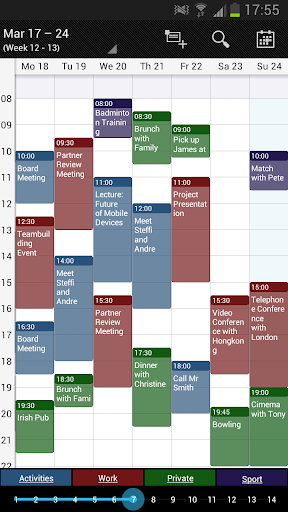
Business Calendar has everything you need in a calendar app: It provides an excellent overview of your appointments, it’s easy to use and it gives you powerful tools to create and manipulate your events.
★ "Our favorite calendar app on Android, due to its flexibility and ease of use." - Lifehacker 01/2014 ★
★ "One of the best Calendar Apps for 2014" - FastCompany ★
Features
▪ Quick Day View: for a fast overview of all events of the day
▪ Favorite Bar: for direct access to all your calendars
▪ smooth scroll and zoom: for better, intuitive interaction
Details
▪ month, week, day, agenda and event view
▪ color-coded year view
▪ scroll- and zoomable multi-day view (1-14 days)
▪ easy switching between timeline bars and event titles in month view
▪ search function
▪ sync your events with Google Calendar, Microsoft Outlook, Exchange etc. using the Android calendar synchronization
▪ professional widgets for month, week, agenda and day view
▪ intuitive handling: just move your finger over some days of interest in month view to open them in multi-day view
▪ many options for recurrent events (e.g. an event that takes place every other week on Tuesday and Thursday)
▪ birthday calendar
▪ context-sensitive help system to optimize your workflow
This free version is ad-supported, but still fully functional. If you’re a heavy calendar user, we believe the best solution for you is the pro version: without ads and with more useful features like:
▪ manage contacts: link contacts to your events
▪ customizable templates: create your own templates for new events
▪ multi-selection: delete, move or copy multiple events at once
▪ drag&drop: move and copy events easily in the multi-day view
▪ tasks add-on: use the integrated task-management tool to sync with Google Tasks & Toodledo
▪ notifications: comprehensive reminder functionality
▪ app theming: light and dark theme for the app
▪ advanced widgets: set colors, font sizes and individual calendars
▪ import & export: quickly import or export all your calendars in .ics format