Sugar Trackr


Sugar Trackr Summary
Sugar Trackr is a ad-supported Android app in Health And Fitness by Qubi. Released in Nov 2020 (5 years ago). It has about 96+ installs Based on AppGoblin estimates, it reaches roughly 5.00 monthly active users and generates around $<10K monthly revenue (0% IAP / 100% ads). Store metadata: updated Dec 15, 2020.
Store info: Last updated on Google Play on Dec 15, 2020 .
0★
Ratings: 0
Screenshots


App Description
Keep track of your insulin intake and sugar levels before and after meals
This application was created to help diabetics keep track of their insulin intake and sugar levels before and after meals.
With a beautiful and modern design, it's easy to use for people of all ages. It will bring life to your data with colorful graphs and summaries.
SugarTrackr is packed with amazing features. Check them below to see how best to use the application:
#Record your data
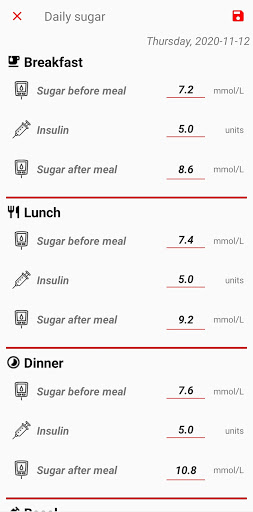
Record your insulin intake and sugar levels before and after the 3 main meals - breakfast, lunch and dinner. Also record your basal insulin before sleep.
#Keep track
You can access and analyze all your previously recorded data in list views or in line chart graphs.
Filter the data by time periods or meals, sort it and check summaries - minimum, maximum and average values.
For the more readable graphs, group the data by days, weeks or months.
#Share reports
Generate chic and data-rich pdf files with data from the selected time period and 3 graphs - daily, weekly and monthly grouped data.
#Add reminders
Never again forget to record any blood sugar levels or insulin intake. Set reminders before and after meals.
#Choose sugar level units
Choose between 2 sugar level units - mmol/L or mg/dL.
#Backup and restore data
Backup your data and share the backups somewhere safe. In case you lose or change your phone, restore everything easily.
Your health is important, so keep track of it.
For more information and a demo check our website - https://sugartrackr.online
If you have any questions or feedback, write to us at sugartrackr@gmail.com
Thank you to:
Library MPAndroidChart for the graphs - https://github.com/PhilJay/MPAndroidChart
Icons by Icons8 - https://icons8.com/