MILE Indic Keyboards


MILE Indic Keyboards Summary
MILE Indic Keyboards is a mobile Android app in Tools by Bhashini AI Solutions Pvt Ltd. Released in Jun 2014 (11 years ago). It has about 6.7K+ installs Based on AppGoblin estimates, it reaches roughly 299 monthly active users . Store metadata: updated Jun 20, 2014.
Recent activity: 1.00 installs this week (1.00 over 4 weeks) View trends →
Store info: Last updated on Google Play on Jun 20, 2014 .
0★
Ratings: 0
Screenshots

App Description
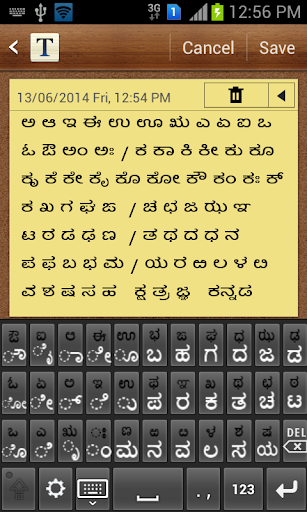
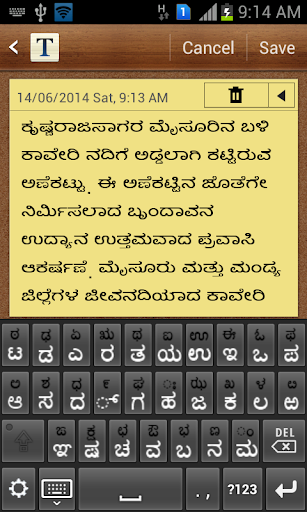
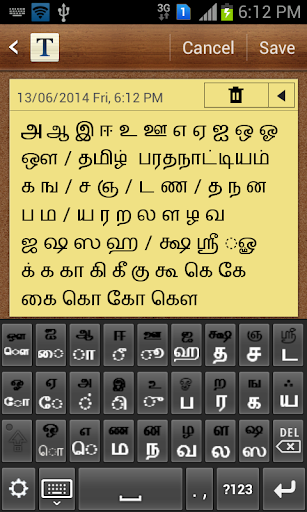
Keyboards to input Devanagari, Kannada, Tamil, Telugu, and Malayalam text.
An input method editor (on-screen keyboard) that enables entering of text in Devanagari, Kannada, Tamil, Telugu, and Malayalam scripts. Users can choose from either InScript or 3x4 keyboard layout. In addition, KaGaPa layout for Kannada and TamilNet99 layout for Tamil are also supported.
This app adds keyboards only and doesn't add any font or rendering engine for displaying indic text. Hence install this app only if your phone/tablet already supports indic text. If your phone properly displays the below indic text, then it has the required indic fonts and rendering engine. However, if you see boxes or disjoint characters then it doesn't.
Kannada: ಬೆಂಗಳೂರು ಕರ್ನಾಟಕದ ರಾಜಧಾನಿ
Telugu: తిరుమల వేంకటేశ్వర స్వామి వెలసిన ఒక పుణ్యక్షేత్రం
Tamil: சென்னை தமிழ்நாட்டின் தலைநகரமும்
Malayalam: ഇന്ത്യയുടെ തെക്കുപടിഞ്ഞാറെ അറ്റത്തുള്ള സംസ്ഥാനമാണ് കേരളം.
Hindi: संस्कृत भारत की एक शास्त्रीय भाषा है।
Installation:
* Install the app from Google play.
* Go to "Settings", open "Language and input".
* Select "IISc MILE Indic Keyboards". Click "OK".
Select language/keyboard:
* Open the app where you want to enter indic text.
* Select input method by either long pressing in the edit text or from the top status bar.
* In "Select input method" dialog, select "IISc MILE Indic Keyboards".
* By default, Kannada "KaGaPa" layout is shown.
* To change language/keyboard, click settings icon at the bottom left of keyboard.
* Select input language followed by keyboard layout.