Image Converter Tool


Image Converter Tool Summary
Image Converter Tool is a ad-supported Android app in Tools by Qinetik. Released in Oct 2023 (2 years ago). It has about 38+ installs Based on AppGoblin estimates, it reaches roughly 3.00 monthly active users and generates around $<10K monthly revenue (0% IAP / 100% ads). Store metadata: updated Oct 23, 2024.
Recent activity: 1.00 installs this week (3.00 over 4 weeks) showing above average growth View trends →
Store info: Last updated on Google Play on Oct 23, 2024 .
0★
Ratings: 0
Screenshots


App Description
Convert PNG, JPG, and WebP images in directories quality and resize options
Image Converter Tool
Image Converter Tool is a simple and easy-to-use app that allows you to convert image formats between PNG, JPG, and WEBP. It also allows you to compress and resize your images, giving you complete control over the quality and size of your output images.
Features
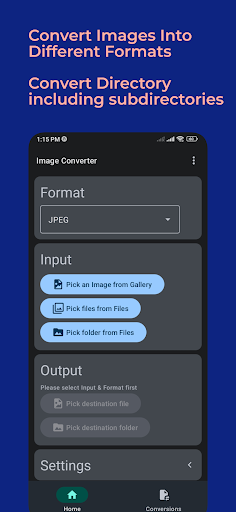
- Convert image formats between PNG, JPG, and WEBP
- Compress and resize images
- Maintain directory structure when converting directories of images
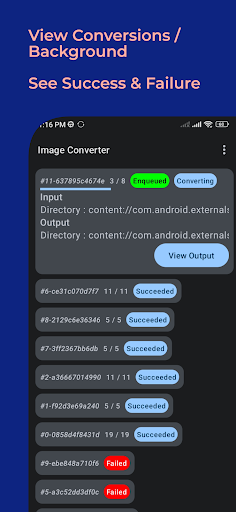
- Convert images off app, so you can close the app while conversions are in progress
- View output folder to see which images and directories are being converted
- Select quality and resized percentage to control the compression and size of your output images
- Multiple methods of selecting input: single image from gallery, single or multiple images from files, directory from files
Benefits
- Save space on your device by compressing your images
- Improve the loading speed of your website or blog by using WEBP images
- Create social media posts and other visuals with the perfect image format and size
- Easily convert directories of images without having to open each image individually
- Close the app while conversions are in progress and come back later to view your output images
How to use Image Converter Tool
- Select the input images or directory of images that you want to convert.
- Select the output format and quality.
- (Optional) Select a resized percentage.
- Tap the "Convert" button.
- View the output folder to see which images and directories have been converted.
Example use cases
- A photographer wants to convert their RAW images to JPEG or PNG format for sharing online.
- A web developer wants to convert their images to WEBP format to improve the loading speed of their website.
- A social media influencer wants to resize their images to the perfect dimensions for each platform.
- A business owner wants to compress the images on their website to save space and improve loading speed.
- A student wants to convert a directory of scanned images to PDF format for their assignment.
Conclusion
Image Converter Tool is the perfect app for anyone who needs to convert, compress, or resize their images. It is simple to use and offers a variety of features to give you complete control over your output images.