My Expenses


My Expenses Summary
My Expenses is a ad-supported, with in-app purchases Android app in Finance by Michael Totschnig. Released in Jan 2012 (14 years ago). It has about 1.4M+ installs and 15.3K ratings with a 4.58★ (excellent) average. Based on AppGoblin estimates, it reaches roughly 26.2K monthly active users and generates around $<10K monthly revenue (65% IAP / 35% ads). Store metadata: updated Apr 6, 2026, version 842.
Recent activity: 576 installs this week (53K over 4 weeks) showing exceptional growth , and 7.00 new ratings this week View trends →
Data tracking: SDKs and third-party integrations were last analyzed on Apr 1, 2026.
Store info: Last updated on Google Play on Apr 6, 2026 (version 842).
My Expenses was last scanned for SDKs 2026-04-01. Below is the overview of third party companies detected in the app. The full list of raw SDKs, app permissions and unknown SDKs is available here.
 Square
 Google
 Microsoft
 Kotlin
 Firebase
 AdMob
AdMob Cash App
4.58★
Ratings: 15.3K
Screenshots


App Description
Easy to use personal finance manager: rich functionality and Open Source.
My Expenses is your ultimate tool for effortless expense tracking and financial management, right at your fingertips!
Key Features:
• Effortless Expense Tracking: Keep tabs on your expenses and income seamlessly, whether you're on your smartphone or tablet.
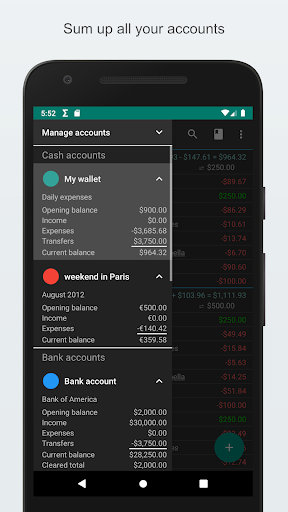
• Flexible Account Management: Effortlessly manage multiple accounts, including transfers between different currencies.
• Streamlined Financial Planning: Easily set up plans for recurring transactions.
• Seamless Data Management: Export and import data with ease using QIF and CSV formats.
• Enhanced Security: Protect your data with password or device lock screen security.
• Customizable Experience: Tailor the app to your preferences with customizable themes and font sizes.
• Bank Statement Reconciliation: Easily compare transaction status with your bank statements for accurate financial tracking.
• Quick Data Entry: Enjoy convenient access with homescreen widgets and shortcuts.
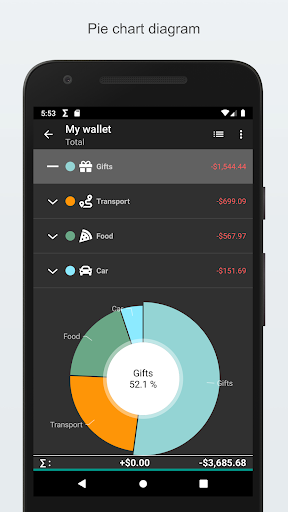
• Powerful Data Analysis: Filter your data based on various criteria and visualize distribution and historical trends with dynamic graphs.
Unlock Premium Features:
• Contrib Key: Say goodbye to ads and unlock unlimited accounts, recurring transaction plans, and more.
• Extended Key: Enjoy cloud synchronization, automated backups, and sophisticated CSV imports.
• Professional Key: Take your financial management to the next level with budgeting tools, receipt scanning, and email support.
My Expenses requires the following permissions:
• Calendar: Plans for future and recurrent transactions are stored either in a special local calendar or in any other calendar you assign.
• Internet: Anonymous usage tracking, Crash reports, Cloud synchronization.
• Accounts: Synchronization across devices via cloud services.
Take control of your finances like never before using My Expenses!