Phraser Board: Paste Keyboard

Phraser Board: Paste Keyboard Summary
Phraser Board: Paste Keyboard is a ad-supported, with in-app purchases Android app in Tools by Gt0. Released in Jul 2022 (3 years ago). It has about 67.8K+ installs Based on AppGoblin estimates, it reaches roughly 3K monthly active users and generates around $<10K monthly revenue (40% IAP / 60% ads). Store metadata: updated Mar 14, 2023.
Recent activity: 248 installs this week (565 over 4 weeks) showing strong growth View trends →
Store info: Last updated on Google Play on Mar 14, 2023 .
0★
Ratings: 0
Screenshots

App Description
Phraser: auto-paste keyboard. Paste keyboard save and easily paste template text
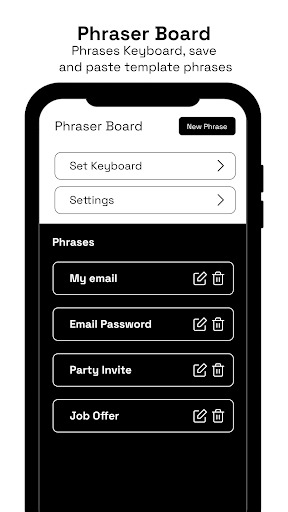
Phraser Board is a keyboard that will make your life easier because you no longer have to write the same phrases every time, now you can easily save to Phraser Board and use it without even going to the application, just by selecting Phraser Keyboard.
You can save any text and easily paste it in the future, save email addresses, passwords, greetings, invitations and any text that you often use in order not to waste time typing it.
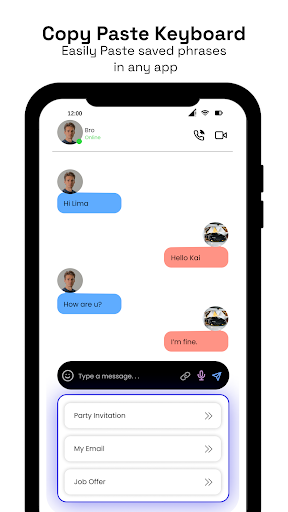
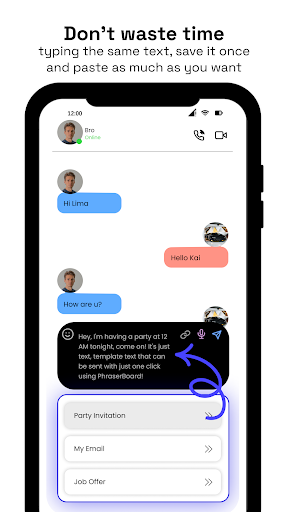
Simply switch easily from your standard keyboard to the Phraser Board to paste saved text with one click. Easily copy-paste any text or phrases.
With this Copy Paste keyboard you don't have to save e.g. addresses or payment details somewhere in your notes. Just add them to Phraser Board - Copy paste keyboard and easily copy-paste them in any app or website.
How to setup Phraser: Paste Keyboard?
1. Go to settings
2. Open General Category
3. Open Keyboard Management Tab
4. Activate Phraser Board
5. Done. Phraser board is ready to use
How to use copy paste keyboard?
1. Open Phraser Board
2. Click “Add Phrase”
3. Enter any phrase you want to save
4. Click “ADD”
5. Your phrase is added, now you can easily switch to phraser keyboard from your keyboard screen and easily paste this phrase.
If you've ever had to type the same text multiple times, the Phraser Board is obviously for you!