Video Downloader for Pinterest


Video Downloader for Pinterest Summary
Video Downloader for Pinterest is a ad-supported, with in-app purchases Android app in Video Players by ETM Video Downloader. Released in Jul 2024 (1 year ago). It has about 4.9M+ installs and 76K ratings with a 4.85★ (excellent) average. Based on AppGoblin estimates, it reaches roughly 423.4K monthly active users and generates around $50K+ monthly revenue (49% IAP / 51% ads). Store metadata: updated Jan 9, 2026, version 86.
Recent activity: 106.2K installs this week (243K over 4 weeks) showing steady growth , and 1K new ratings this week View trends →
Advertising: AppGoblin detected 1.00 monetized ad creatives shown inside the app.
Data tracking: SDKs and third-party integrations were last analyzed on Feb 27, 2026. The app's network data flows (API traffic to/from the app and its SDKs) were last crawled on Feb 14, 2026.
Store info: Last updated on Google Play on Jan 9, 2026 (version 86).
Video Downloader for Pinterest was last scanned for SDKs 2026-02-27. Below is the overview of third party companies detected in the app. The full list of raw SDKs, app permissions and unknown SDKs is available here.
 Keepsafe
 InMobi
 VK
VK ironSource
 AppLovin
 Bumptech
 Snap
Snap Amazon Advertisement
 Square
 AdMob
AdMob Firebase
4.85★
Ratings: 76K
Screenshots



App Description
Download video, photo, GIF and image from Pinterest fast & easy, HD
Video Downloader for Pinterest helps you quickly download high-quality videos, GIFs, and photos from Pinterest. Pinterest Saver is an easy-to-use app that helps you save Pinterest videos and photos to albums, enabling offline playback and sharing of ideas with your friends.
Features:
- No login required.
- Fast download speed.
- Safe & light & HD.
- Easy to use with a simple and clear interface.
- Support multiple formats: video, photo, gif, and image.
- See file sizes of quality options and decide easily which you want to download from Pinterest.
How to save videos from Pinterest? Method 1
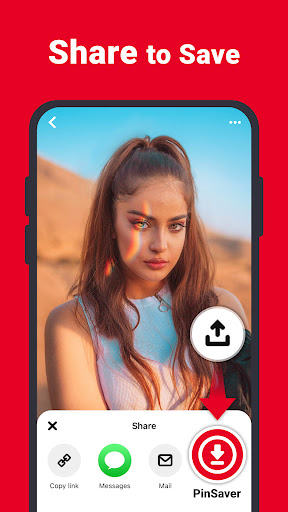
1. Open the Pinterest app, click on the share icon.
2. Click this Pinterest downloader app icon on the opened popup.
3. Click the download button to the quality you want to save with this Pinterest Downloader.
4. Done! Your video will be downloaded automatically.
Method 2
1. Open the Pinterest app, click on the share icon and click "Copy Link".
2. Open the Pinterest video download app and click the save icon to the quality you want.
3. If you don't see download options popup, then paste the link and click Pinterest video download. Then apply step 2.
4. Done! Your video will be downloaded automatically.
Where are the videos stored? All videos saved from the app will be stored in a folder under the name Pinterest Downloader.
Disclaimer:
- We are not responsible for any intellectual property violation that results from an unauthorized repost of a video or photo.
- This app is not associated with Pinterest.