Quick PDF All-in-One PDF Tools

Quick PDF All-in-One PDF Tools Summary
Quick PDF All-in-One PDF Tools is a ad-supported Android app in Productivity by CrazyDeveloperG. Released in Feb 2026 (3 months ago). It has about 20+ installs Based on AppGoblin estimates, it reaches roughly 3.00 monthly active users and generates around $<10K monthly revenue (0% IAP / 100% ads). Store metadata: updated Feb 8, 2026.
Recent activity: 1.00 installs this week (3.00 over 4 weeks) showing steady growth View trends →
Store info: Last updated on Google Play on Feb 8, 2026 .
0★
Ratings: 0
Screenshots


App Description
Open, read, edit, merge, split, Watermark & sign PDF documents | Images to PDF
All-in-One PDF Reader & Editor – Your Complete Document Solution
Looking for a fast, lightweight PDF reader that does more than just viewing? This app is a powerful PDF tool designed to handle all your document needs right from your phone or tablet.
📖 Read & View PDF Files
Open and read PDF documents with a smooth, fast viewer. Enjoy comfortable reading with night mode, zoom, scroll, and page navigation. Whether it's books, reports, or invoices — view any PDF file instantly.
✏️ Edit Text in PDF
Need to make quick changes? Add, edit, or modify text directly inside your PDF documents. Change font style, size, color, alignment, and more. Rotate text freely and position it exactly where you want using an intuitive editor.
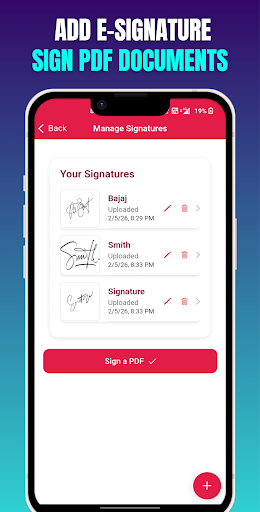
✍️ Sign PDF Documents
Draw your signature and place it on any page. Sign contracts, agreements, and forms digitally — no printing required. Save time with a built-in electronic signature tool.
🔀 Merge PDF Files
Combine multiple PDF documents into a single file. Select the files you want, arrange the order, and merge them in seconds. Perfect for organizing reports, school projects, or work documents.
✂️ Split PDF Pages
Extract specific pages from a large PDF. Split documents into smaller, manageable files. Choose individual pages or page ranges to create new documents quickly.
🔄 Rotate PDF Pages
Fix page orientation with one tap. Rotate individual pages or all pages at once — 90°, 180°, or 270°. Save the rotated document and share it instantly.
💧 Add Watermark to PDF
Protect your documents by adding text watermarks. Customize the watermark text, color, size, position, and opacity. Keep your files secure and branded.
🖼️ Convert PDF to Images
Turn PDF pages into high-quality JPG or PNG images. Convert single pages or entire documents. Great for sharing specific pages on social media or in presentations.
📐 PDF to Long Image
Stitch all pages into one continuous long image — ideal for sharing entire documents as a single scrollable picture.
📤 Share & Print
Share your edited PDFs, merged files, or converted images directly via email, messaging apps, or cloud storage. Print documents straight from the app.
Why Choose This PDF App?
• Fast & lightweight — opens files instantly
• Works completely offline — no internet required for core features
• Clean, intuitive interface — easy for everyone
• All-in-one toolkit — no need for multiple apps
• Supports large PDF files
• Free to use
Who Is This App For?
Whether you're a student organizing study material, a professional handling contracts and reports, or anyone who works with documents daily — this PDF reader and editor is built for you.
Download now and take full control of your PDF documents. Read, edit, sign, merge, split, rotate, watermark, and convert — all in one app.