TV Remote for Sony (Smart TV R

TV Remote for Sony (Smart TV R Summary
TV Remote for Sony (Smart TV R is a ad-supported Android app in Video Players by Spikes Labs. Released in Apr 2014 (11 years ago). It has about 5.3M+ installs and 18.1K ratings with a 3.87★ (average) average. Based on AppGoblin estimates, it reaches roughly 30.3K monthly active users and generates around $<10K monthly revenue (0% IAP / 100% ads). Store metadata: updated Jul 21, 2024.
Recent activity: 24.7K installs this week (25.7K over 4 weeks) showing exceptional growth , and -2 new ratings this week View trends →
Store info: Last updated on Google Play on Jul 21, 2024 .
3.87★
Ratings: 18.1K
Screenshots


App Description
Smart TV Remote For Sony TV. Remote control for Sony TV works with IR/WiFi
TV Remote for Sony allows you to control your Sony Smart TV just like real remote. All the remote buttons are supported. It includes latest features like view photos, play videos and music from your phone on big TV Screen. Sleep Timer, inbuilt Media Player, Control TV via voice commands, shake phone to play/pause.
Tired of trying so many remote apps without any results? Not tried this TV Remote Control app, then what's the point? Now what? Download this free app right now, because this is exactly what you are looking for.
It works in 2 modes. Either on your home WiFi network or Infrared IR blaster.
WiFi Mode
- You must have WiFi connected Sony Smart TV
- Connect your phone to same WiFi network.
- Launch the app and accept confirmation message appears on your Sony TV screen.
- Confirmation message can be accepted in your Sony TV Settings at HOME → Network → Home Network Setup → Remote Device → Remote Device List in case if it is rejected by mistake.
- All Remote buttons are supported except "POWER ON". Because your TV does not have WiFi connection when its in off condition, so it can not process the wifi commands.
Infrared IR Blaster Mode
- Inbuilt IR Blaster must be present in your phone such as Samsung Galaxy S, Note 4, LG G3/G4/G5, HTC ONE, Xiaomi Mi / Redmi etc.
- Launch the app and control your Sony TV directly.
- No additional hardware is required for Sony TV remote app.
How to Use
https://www.youtube.com/watch?v=2-MDI2pKANU&feature=youtu.be
Advanced Details
https://www.spikesroidapps.com
Feature List
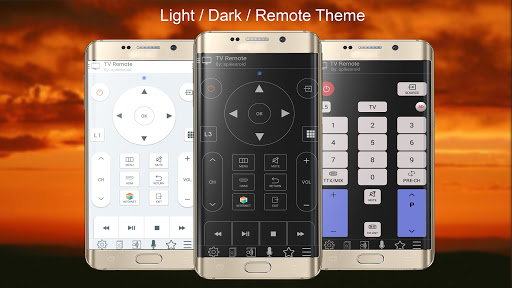
✓ All Sony TV Remotes buttons are supported
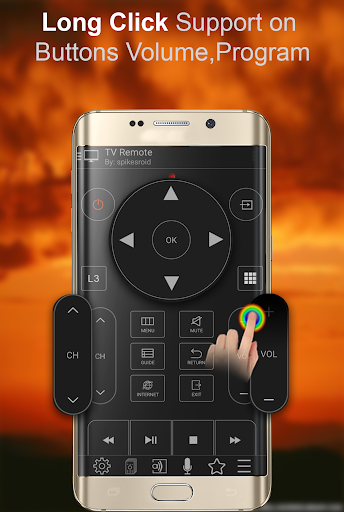
✓ Long click on buttons is supported (volume, program, left, right, up, down)
✓ Volume Control by side buttons
✓ Image mirroring DLNA feature. Watch photos, audio, video of your phone on your TV
✓ Sleep Timer and Audio/Video Player
✓ TV behaves as Play/Pause/Mute on Incoming call
✓ Shake phone to play/pause media
✓ Create Customized remot