AI Audio To Text - AI Listen

AI Audio To Text - AI Listen Summary
AI Audio To Text - AI Listen is a ad-supported, with in-app purchases Android app in Productivity by Roxanne Crete. Released in Mar 2018 (8 years ago). It has about 942.2K+ installs and 4.1K ratings with a 1.58★ (poor) average. Based on AppGoblin estimates, it reaches roughly 51.6K monthly active users and generates around $10K+ monthly revenue (71% IAP / 29% ads). Store metadata: updated May 26, 2025.
Recent activity: 40.8K installs this week (71.5K over 4 weeks) showing exceptional growth View trends →
Store info: Last updated on Google Play on May 26, 2025 .
1.58★
Ratings: 4.1K
Screenshots


App Description
Convert your audio to text into any language, Quick, Accurate and Smooth..!!!.
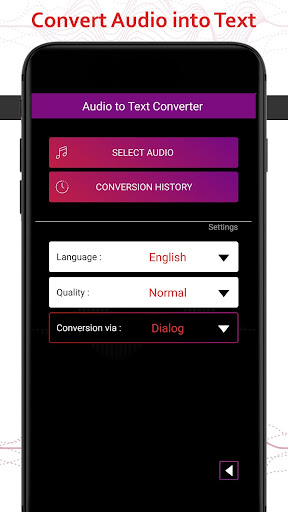
Audio To Textapp provide user to get their Audio to text form. Now, with 'Audio to Text' you can convert voice note to text accurately! It converts audio from all applications. Easily translate audio to text within some time with all new Audio to Text Android app. You can also use as speech to text app, just record voice and translate to text.
Voice to Text Converter - For All Audio is the easiest way to read your voice messages or clips when you can not listen them! Download Audio To Text voice message transcriber app now and instead of listening your voice messages, read them after conversion !
Supported Audio Formats : MP3, OGG, OGG (opus Codec), AAC, MP4, MPEG, AMR, WAV, M4A, FLAC
Supported Languages: afrikaans, catalan, german, english, spanish, french, croatian, italian, dutch, polish, portuguese, russian, romanian, swedish, turkish, greek, Hindi, chinese, korean, japanese, urdu (Català, Deutsch, English, Español, Français, Hrvatski, Italiano, Nederlands, Polski, Português, Русский, Română, Svenska, Türkçe, Ελληνικά, हिन्दी, 中文, 한국어, 日本語, اردو)
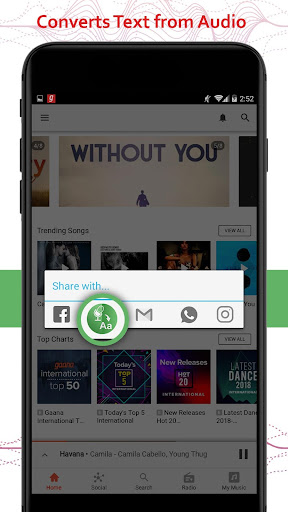
How to use : First of all download this Audio To Textapp. Install it. Now for e.g:-If u get any audio clip in Whats app or hike etc..app share that clip with "Audio To Text" application, that will give you text formate on "Dialogue box" of this application. Now You can have quotes or dialogue in text from audio clip,with Audio To Textapp. Enjoy it by sharing your text via these app.
Features:
=> Supports all types of audio formates
=> Converts Audio clips from various applications
=> Easy to share converted text among social media
=> Supports Multiple languages
=> No Limits to convert or translate audio to text
=> Converted text autometically saved to our app
=> One click to convert and translate your audio to text and share