My Measures

My Measures Summary
My Measures is a with in-app purchases Android app in Productivity by The AppDev Studio. Released in Jul 2016 (9 years ago). It has about 1M+ installs and 3.8K ratings with a 3.44★ (mixed) average. Based on AppGoblin estimates, it reaches roughly 7.8K monthly active users and generates around $<10K monthly revenue (100% IAP / 0% ads). Store metadata: updated Aug 1, 2025, version 38.
Recent activity: 580 installs this week (2.7K over 4 weeks) showing steady growth , and 7.00 new ratings this week View trends →
Data tracking: SDKs and third-party integrations were last analyzed on May 1, 2026. The app's network data flows (API traffic to/from the app and its SDKs) were last crawled on Mar 19, 2026.
Store info: Last updated on Google Play on Aug 1, 2025 (version 38).
SDKs, Trackers & Permissions
My Measures was last scanned for SDKs 2026-05-01. Below is the overview of third party companies detected in the app. The full list of raw SDKs, app permissions and unknown SDKs is available here.
AppGoblin saw My Measures uses 6 Development Tools
 Kotlin
 JetBrains IntelliJ
 Square
AppGoblin saw My Measures uses 2 Ad Networks
 Facebook
 Google
AppGoblin saw My Measures uses 1 Business Tools
 RevenueCat
AppGoblin saw My Measures uses 1 Analytics: Product
 Firebase
App Details
App Store
Ads & App-Ads.txt
AppGoblin SDK Scans
3.44★
Ratings: 3.8K
Screenshots

App Description
My Measures is a powerful application for storing and sharing object dimensions.
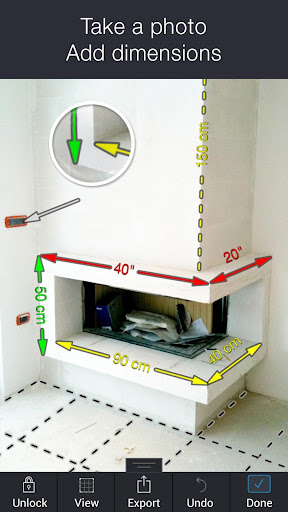
Making paper sketches of objects can be a tedious job. You have to draw the object, add dimensions and make sure others will understand what you meant. Often they don´t. My Measures & Dimensions is a powerful application for storing and sharing object dimensions. All you have to do is take a photo of an object and add dimensions: arrows, angles, photos of details and equip them with text comments for easier understanding.
My Measures & Dimensions is a must have tool for real estate agents, engineers, carpenters, architects, auction sellers, construction workers, Interior Designers, DIY or for home renovation.
My Measures & Dimensions Key features:
- Annotate photo with arrows, angles and text comments
- Include multiple detail photos
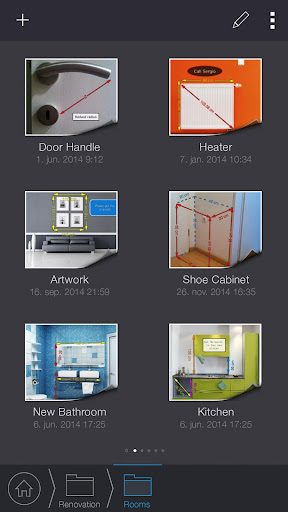
- Organize projects in folders
- Imperial, Metric, Chinese and Japanese units
- Supports Fractions
PRO features available via in-app purchases:
- Export projects to Dropbox, Google Drive, …
- Unlimited files and annotations
- Top App Cloud backup