Skeleton Watch Face


Skeleton Watch Face Summary
Skeleton Watch Face is a ad-supported, with in-app purchases Android app in Personalization by Systorso Inc.. Released in Nov 2023 (2 years ago). It has about 11.1K+ installs and 145 ratings with a 4.16★ (good) average. Based on AppGoblin estimates, it reaches roughly 433 monthly active users and generates around $<10K monthly revenue (73% IAP / 27% ads). Store metadata: updated Oct 29, 2024.
Recent activity: 290 installs this week (615 over 4 weeks) showing exceptional growth , and 1.00 new ratings this week View trends →
Data tracking: SDKs and third-party integrations were last analyzed on Dec 10, 2024.
Store info: Last updated on Google Play on Oct 29, 2024 .
4.16★
Ratings: 145
Screenshots

App Description
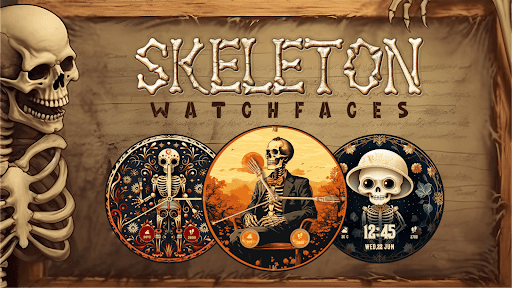
Get ready for bone chilling experience with variety of skeleton theme watchfaces
Wish to add the skeleton & skull theme watch faces on the wear watchscreen?
Look no further! The Skeleton Watch Face app is here for you.
The application offers minimalistic skeleton watch faces that strike the perfect balance between style and simplicity. You are gonna love it!
The app offers analog and digital dials. Select your preference and track the time in your own style. Stand out from the crowd with this eye-catching skeleton watch face design.
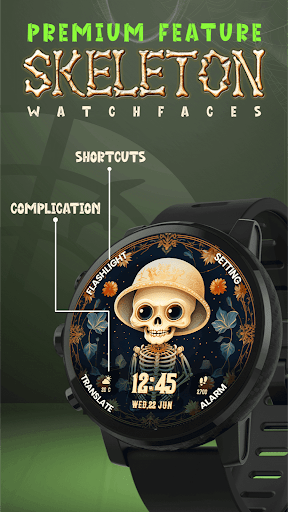
Customize shortcuts on your watch face for quick access to your favorite and most used functions. It will make your Android smartwatch experience even more convenient. You can select and set the alarm, translate, settings, flashlight, and other features on the watch display. But this is only for premium user.
This skeleton watchfaces application supports a wide range of Wear OS smartwatches. It includes popular brands and watches. You can use this app in the Samsung Galaxy Watch4/Watch4 Classic, Huawei Watch 2 Classic/Sports, Fossil smartwatches, Mobvoi Ticwatch Series, LG Watch, Sony Smartwatch 3, and more.
Looking for a unique and attention-grabbing watchface? Our Skeleton Watch Face app is here that bring something for everyone. Download now and put a skeleton background watchface on your wristwear.
We have used some premium watchface in showcase of application so may it will be not free inside app. And we also only provide initially single watchface inside watch application for apply different watchface you need to download mobile application as well you from mobile application you can set different watchfaces on your Wear OS watch.
Set Skeleton Watchface theme for your android wear OS watch and enjoy.
How to Set?
-> Install Android app in mobile device & wear OS app in watch.
-> Select Watch face on mobile app it will show preview on next individual screen. (you can see selected watch face preview on screen).
-> Click on "Apply Theme" Button on mobile app to set watch face in Watch.
Please note that we as application publisher don't have control over download & installation issue, We have tested this app in real device
Disclaimer : Initially we provide only single watch face on wear os watch but for more watchface you have to download mobile app as well and from that mobile app you can apply different watchface on watch.