GTalk - 지톡


GTalk - 지톡 Summary
GTalk - 지톡 is a mobile Android app in Business by Madras check. Released in Jan 2018 (8 years ago). It has about 20K+ installs Based on AppGoblin estimates, it reaches roughly 1.8K monthly active users . Store metadata: updated Nov 20, 2025.
Recent activity: 32 installs this week (106 over 4 weeks) showing below average growth View trends →
Store info: Last updated on Google Play on Nov 20, 2025 .
0★
Ratings: 0
Screenshots

App Description
G-Ware works messenger services
G-Talk
Z-Talk, a mobile work messenger that works with In-Age Groupware G-Ware!
G-Talk notifies you by chatting message when new contents are registered in G-Ware's email, electronic payment, bulletin board, schedule, and makes it easy to check on mobile. In addition, you can conduct business through chat with members of the company, enabling organic cooperation.
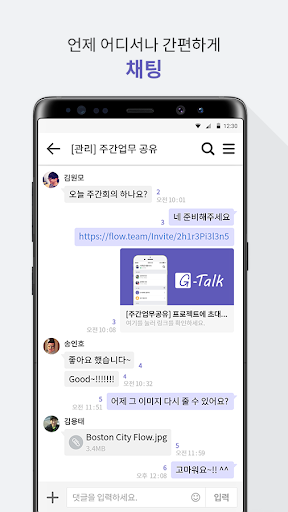
[Easy and quick to work by chatting]
-You can communicate quickly and easily with business chat.
-You can easily exchange images, files, and web links.
-Choose a team, employees registered in the company and start chatting easily.
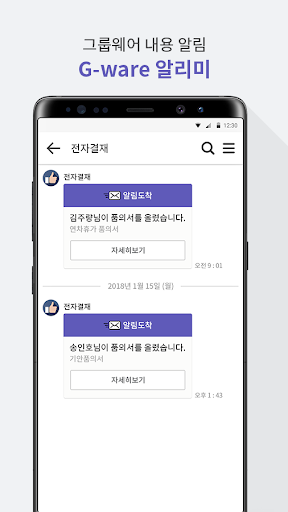
[Send the contents registered in G-ware as a notification]
-Chat with G-Ware to notify you when new contents are registered.
-Groupware email, electronic payment, bulletin board, schedule, etc. are all supported.
-Select a notification to see more details.
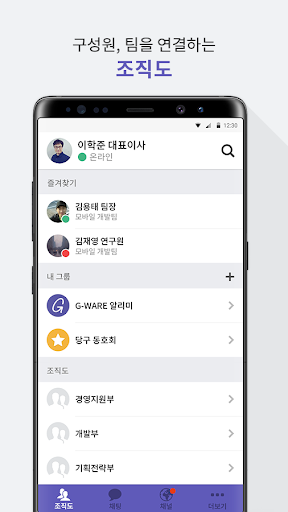
[Team/Company organization linkage]
-The organization chart of the team/company registered in G-ware can be used as it is.
-Select a desired team member and proceed with a few touches on your mobile.
-Select a team member/team who works frequently and register as a group.
-If you use your favorites well, you can communicate more quickly and conveniently.
[When and wherever we are]
-Change your status information in the profile to suit your situation.
-Installation type in the office, mobile from the outside! Experience the perfect link.
-Please feel free to contact our customer service center (help@flow.team) for any inconvenience or improvement!