AI Translator Keyboard & Chats


AI Translator Keyboard & Chats Summary
AI Translator Keyboard & Chats is a free, ad-supported, with in-app purchases Android app in Tools by TFL Signature Apps. Store last updated Aug 6, 2026
AI Translator Keyboard & Chats SDKs Summary
App not yet scanned for SDKs.
0★
Ratings:
Screenshots


App Description
Translate any language instantly with keyboard, chat & photo translator app
Communicate easily across languages with AI Translator Keyboard & Chats—an easy translator designed for typing, chatting, reading, and understanding content in different languages.
Whether you are talking with international friends, replying to messages, travelling, studying, or translating text from an image, this app brings multiple translation tools together in one convenient place.
The app includes a custom keyboard with a built-in translator. Simply type in your preferred language, tap the translate option, and convert your message into another language instantly—without repeatedly copying and pasting text between different apps.
Translate directly from your keyboard
Use the built-in Keyboard Translator while chatting, writing emails, posting comments, or using supported apps.
Type your message in your own language, select the language you want, and translate it with one tap. The translated text can then be inserted directly into your conversation.
The keyboard translator helps you:
• Type in your preferred language
• Translate text with one tap
• Communicate with people from different countries
• Write translated messages without switching apps
• Use translation while chatting or typing
All Language Translator
The All Language Translator helps you translate words, sentences, and complete messages between multiple languages.
Enter or paste your text, select the source and target languages, and receive the translation within seconds. It is useful for everyday communication, travel, learning, work, and social conversations.
Use the easy translator to:
• Translate into different languages
• Understand unfamiliar words and messages
• Translate copied text
• Communicate while travelling
• Practise and learn new languages
• Translate personal and professional conversations
Chat Translator with built-in keyboard
Chat naturally with people who speak different languages using the Chat Translator with built-in keyboard.
Write your message in the language you know, translate it, and send the translated version during your conversation. This makes multilingual chatting simpler and reduces the need to move between separate translation and messaging apps.
It is useful for:
• International conversations
• Social media chats
• Customer communication
• Travel-related messages
• Conversations with friends and family
• Learning how sentences appear in another language
Photo Translator
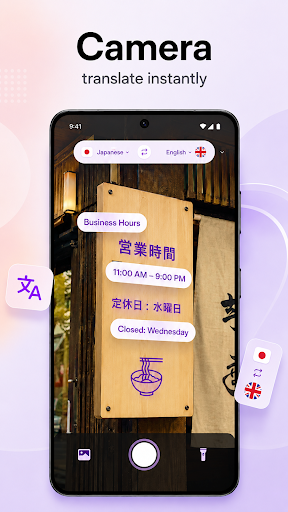
See text in an image that you cannot understand? Use the Photo Translator to translate visible text from photos.
Choose an image or capture text with your camera, then translate the detected content into your selected language. This feature can help with signs, menus, labels, documents, instructions, posters, and other printed content.
The photo translator is helpful for:
• Menus and restaurant information
• Road signs and travel directions
• Product labels and packaging
• Printed notes and documents
• Posters and announcements
• Text found in saved images
Custom keyboard themes
Personalise your typing experience with a collection of Keyboard Themes.
Choose a theme that suits your style and give your custom translator keyboard a fresh appearance. Switch between available designs while keeping translation tools easily accessible from the keyboard.
Main features
• All Language Translator
• Easy Translator for everyday text
• Translate into different languages
• Built-in Keyboard Translator
• Chat Translator
• One-tap keyboard translation
• Photo Translator
• Custom keyboard themes
• Simple language selection
• Fast and convenient translation workflow
• Translation without repeatedly copying and pasting