Digital Vision Watch Face

Digital Vision Watch Face Summary
Digital Vision Watch Face is a ad-supported, with in-app purchases Android app in Personalization by RichFace. Released in Jun 2017 (8 years ago). It has about 420.5K+ installs and 2.6K ratings with a 4.32★ (good) average. Based on AppGoblin estimates, it reaches roughly 1.3K monthly active users and generates around $<10K monthly revenue (43% IAP / 57% ads). Store metadata: updated May 8, 2026.
Recent activity: 156 installs this week (657 over 4 weeks) showing steady growth , and 4.00 new ratings this week View trends →
Data tracking: SDKs and third-party integrations were last analyzed on Mar 9, 2026. The app's network data flows (API traffic to/from the app and its SDKs) were last crawled on Aug 1, 2025.
Store info: Last updated on Google Play on May 8, 2026 .
Digital Vision Watch Face was last scanned for SDKs 2026-03-09. Below is the overview of third party companies detected in the app. The full list of raw SDKs, app permissions and unknown SDKs is available here.
 JetBrains IntelliJ
 Google
 Greenrobot
 ReactiveX
 Firebase
 AdMob
AdMob4.32★
Ratings: 2.6K
Screenshots


App Description
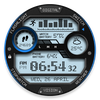
Digital Vision is a digital watch face and fully supported for Wear OS
Upgrade your wrist with Digital Vision—the ultimate high-tech, rugged utility watch face designed exclusively for Wear OS 6.
Combining a bold, industrial aesthetic with modern data tracking, Digital Vision provides a professional-grade dashboard for your smartwatch. Whether you are tracking your fitness goals or monitoring your portfolio, this watch face puts everything you need in one sleek, "visionary" interface.
Available in FREE and PREMIUM versions. Upgrading to Premium unlocks our full suite of features.
Key Premium Features:
⌚ Optimized for Wear OS 6: Built specifically for the latest generation of smartwatches for peak performance and battery efficiency.
👟 Advanced Fitness Tracking: Real-time steps counter with a visual progress ring and dedicated heart rate monitoring.
📊 Financial Complications: Stay updated on the go with dedicated support for crypto and stocks complications.
🔋 Dual Battery Sync: Monitor both your watch battery and phone battery levels simultaneously from your wrist.
🗓️ Smart Utility: Integrated calendar view, upcoming events, and quick-access shortcuts for Alarm, Phone, and Menu.
🛰️ Industrial Design: A rugged, dot-matrix digital style with a premium "Vision" textured frame and blue accent lighting.
🚀 Maximize your complication slots!
Use the Data Builder in Wear OS Toolset https://play.google.com/store/apps/details?id=com.gs.complications.suite&hl=en to stack multiple data points into a single space.
Installation Note:
This watch face is designed specifically for devices running Wear OS 6 or higher. Please ensure your device is updated for full compatibility.
★ FAQ
!! Please contact us if you have any trouble with the app !!
richface.watch@gmail.com
★ PERMISSIONS Explained
https://richface.watch/privacy