VOYAGER WorldTimer Watch Face

2.2K installs
31 ratings
+36 weekly installs
trend steady
+151 monthly installs
trend steady
VOYAGER WorldTimer Watch Face icon

ASO Keyword Dashboard

Tracking 126 keywords for VOYAGER WorldTimer Watch Face in Google Play

Developer: WatchBase Category: personalization Rating: 4.4

VOYAGER WorldTimer Watch Face tracks 126 keywords (no keywords rank yet; 126 need traction). Key metrics: opportunity 70.5, difficulty 47.4.

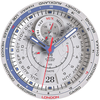
Super realistic, functional and super festive watch face!

Tracked keywords

126

0  ranked •  126  not ranking yet

Top 10 coverage

Best rank — • Latest leader —

Avg opportunity

70.5

Top keyword: moon

Avg difficulty

47.4

Lower scores indicate easier wins

Opportunity leaders

  • moon

    Opportunity: 74.0 • Difficulty: 38.7 • Rank —

    Competitors: 294

    60.7
  • hands

    Opportunity: 74.0 • Difficulty: 42.4 • Rank —

    Competitors: 663

    65.4
  • white

    Opportunity: 74.0 • Difficulty: 43.1 • Rank —

    Competitors: 931

    66.1
  • watch faces

    Opportunity: 74.0 • Difficulty: 36.5 • Rank —

    Competitors: 38

    60.3
  • youtube

    Opportunity: 74.0 • Difficulty: 64.4 • Rank —

    Competitors: 839

    63.0

Unranked opportunities

  • moon

    Opportunity: 74.0 • Difficulty: 38.7 • Competitors: 294

  • hands

    Opportunity: 74.0 • Difficulty: 42.4 • Competitors: 663

  • white

    Opportunity: 74.0 • Difficulty: 43.1 • Competitors: 931

  • watch faces

    Opportunity: 74.0 • Difficulty: 36.5 • Competitors: 38

  • youtube

    Opportunity: 74.0 • Difficulty: 64.4 • Competitors: 839

High competition keywords

  • time

    Total apps: 392,268 • Major competitors: 18,179

    Latest rank: — • Difficulty: 57.9

  • new

    Total apps: 376,268 • Major competitors: 24,058

    Latest rank: — • Difficulty: 58.8

  • make

    Total apps: 331,343 • Major competitors: 20,585

    Latest rank: — • Difficulty: 57.9

  • find

    Total apps: 301,105 • Major competitors: 17,483

    Latest rank: — • Difficulty: 58.5

  • information

    Total apps: 263,219 • Major competitors: 8,109

    Latest rank: — • Difficulty: 54.8

All tracked keywords

Includes opportunity, difficulty, rankings and competitor benchmarks

Major Competitors
play661006085

201,969 competing apps

Median installs: 7,518

Avg rating: 2.8

20,103

major competitor apps

new641005989

376,268 competing apps

Median installs: 2,970

Avg rating: 2.6

24,058

major competitor apps

themes721004871

26,379 competing apps

Median installs: 8,568

Avg rating: 3.0

2,169

major competitor apps

order671005282

139,481 competing apps

Median installs: 563

Avg rating: 2.3

4,290

major competitor apps

try691005578

78,636 competing apps

Median installs: 7,241

Avg rating: 2.8

7,816

major competitor apps

make651005888

331,343 competing apps

Median installs: 2,457

Avg rating: 2.5

20,585

major competitor apps

phone671006083

149,971 competing apps

Median installs: 3,588

Avg rating: 2.6

9,361

major competitor apps

section711004672

32,154 competing apps

Median installs: 1,214

Avg rating: 2.2

1,113

major competitor apps

classic701005176

59,210 competing apps

Median installs: 3,522

Avg rating: 2.8

4,748

major competitor apps

wear711006172

32,034 competing apps

Median installs: 378

Avg rating: 1.9

867

major competitor apps

design681005280

96,909 competing apps

Median installs: 1,967

Avg rating: 2.4

4,813

major competitor apps

moon741003961

6,391 competing apps

Median installs: 1,518

Avg rating: 2.4

294

major competitor apps

information651005586

263,219 competing apps

Median installs: 1,198

Avg rating: 2.2

8,109

major competitor apps

control671005482

132,079 competing apps

Median installs: 1,840

Avg rating: 2.4

7,356

major competitor apps

people681005480

101,482 competing apps

Median installs: 2,978

Avg rating: 2.5

5,703

major competitor apps

avoid711005172

35,145 competing apps

Median installs: 2,260

Avg rating: 2.4

2,184

major competitor apps

choose661005684

198,791 competing apps

Median installs: 2,788

Avg rating: 2.6

13,734

major competitor apps

find651005887

301,105 competing apps

Median installs: 2,814

Avg rating: 2.6

17,483

major competitor apps

option701004974

46,949 competing apps

Median installs: 3,056

Avg rating: 2.5

2,512

major competitor apps

time641005889

392,268 competing apps

Median installs: 1,395

Avg rating: 2.4

18,179

major competitor apps

available661005884

193,514 competing apps

Median installs: 2,803

Avg rating: 2.5

10,343

major competitor apps

complication731006458

4,368 competing apps

Median installs: 366

Avg rating: 1.8

34

major competitor apps

swipe721004969

21,747 competing apps

Median installs: 4,381

Avg rating: 2.8

1,629

major competitor apps

note711004872

31,383 competing apps

Median installs: 4,310

Avg rating: 2.7

1,666

major competitor apps

process701004876

55,639 competing apps

Median installs: 1,000

Avg rating: 2.2

1,902

major competitor apps

126 keywords
1 of 6

App Description

Super realistic, functional and super festive watch face!

Our new VOYAGER watch face is a precisely crafted Worldtimer with a very functional and realistic design for Wear OS!

Enjoy the classic look with additional Christmas/Winter themes and with a
Multi-Function display, you can customize the info that matters to you!

NOTE: Please read the how to section and installation section !!!

ⓘ Features:

- Worldtimer.
- 12 different Time zones indicator.
- Multi-function Display (MFD).
- Very realistic.
- Changeable HANDS color (6 colors).
- Changeable indicator hands color (2 colors day/night).
- Changeable SECONDS hand color (5 colors).
- Changeable BACKGROUND color/theme (10 different backgrounds).
- Time and date.
- AOD (Always on display).

ⓘ How to:

- To customize your watch face, touch and hold on the screen, then tap on customize.
* IMPORTANT - if you enable MFD display you must choose/customize it with the information you want. If you turn off the MFD you must choose "Empty" as a complication option to avoid text/info being displayed over the Month indicator.

ⓘ Moon-phase indicator

- The moon phases indicator is only available in white color theme. If enabled the Moon-phase indicator overlays the MFD (if enabled).

Want another SUPER REALISTIC watch face? Here you go:
https://play.google.com/store/apps/details?id=wb.luna.benedicta

ⓘ Installation

How to install: https://watchbase.store/static/ai/
After installation: https://watchbase.store/static/ai/ai.html

* Luna Benedicta watch face shown in the "How to install" and "After installation". The same installation process is valid for all of our watch faces.

If you have any issues installing the watch face, please note that we have no control over the installation process or any other Google Play / Watch processes. The most common issue that people face is after they buy the watch face and install it, they can't see/find it.

In order to apply the watch face after you install it, touch and hold on the main screen (your current watch face) the swipe left to look for it. If you can't see it, tap on the " + " sign at the end (add a watch face) and find our watch face there.

We use a companion app for the phone to make the installation process easier. If you buy our watch face, tap on the install button (on the phone app) you must check your watch.. a screen will appear with the watch face.. tap install again and wait for the installation to finish. If you already bought the watch face and it still asks you to buy it again on the watch, don't worry you will not be charged twice. This is a common synchronization issue, just wait a little or try to restart your watch.

Another solution for installing the watch face is to try to install it from a browser, logged with your account (google play account that you use on the watch).


JOIN WatchBase.

Facebook group (General watch faces group):
https://www.facebook.com/groups/1170256566402887/

Facebook page:
https://www.facebook.com/WatchBase

Instagram:
https://www.instagram.com/watch.base/

SUBSCRIBE to our YouTube channel:
https://www.youtube.com/c/WATCHBASE?sub_confirmation=1
https://www.youtube.com/c/WATCHBASE