Wordpad Plus – Word Processor

Wordpad Plus – Word Processor Summary
Wordpad Plus – Word Processor is a ad-supported, with in-app purchases Android app in Productivity by Griffin Developer Labs. Released in Aug 2023 (2 years ago). It has about 235.5K+ installs and 1.4K ratings with a 4.32★ (good) average. Based on AppGoblin estimates, it reaches roughly 37.5K monthly active users and generates around $<10K monthly revenue (30% IAP / 70% ads). Store metadata: updated Jan 1, 2026, version 292.
Recent activity: 1.6K installs this week (5.5K over 4 weeks) showing steady growth , and 7.00 new ratings this week View trends →
Data tracking: SDKs and third-party integrations were last analyzed on Mar 28, 2026. The app's network data flows (API traffic to/from the app and its SDKs) were last crawled on Mar 28, 2026.
Store info: Last updated on Google Play on Jan 1, 2026 (version 292).
SDKs, Trackers & Permissions
Wordpad Plus – Word Processor was last scanned for SDKs 2026-03-28. Below is the overview of third party companies detected in the app. The full list of raw SDKs, app permissions and unknown SDKs is available here.
AppGoblin saw Wordpad Plus – Word Processor uses 7 Development Tools
 JetBrains IntelliJ
 Greenrobot
 Google
AppGoblin saw Wordpad Plus – Word Processor uses 2 Ad Networks
 Facebook
AppGoblin saw Wordpad Plus – Word Processor uses 1 Mediation
 AdMob
AdMobAppGoblin saw Wordpad Plus – Word Processor uses 1 Analytics: Product
 Firebase
App Details
App Store
Ads & App-Ads.txt
AppGoblin SDK Scans
4.32★
Ratings: 1.4K
Screenshots


App Description
Write, edit & export documents offline. OCR scanner, PDF tools no data collected
Write anywhere. Share anything. Own your data.
Wordpad Plus is the word processor for Android that works completely offline — no Google account, no cloud sync, no data collection. Just write.
WORD PROCESSOR & RICH TEXT EDITOR
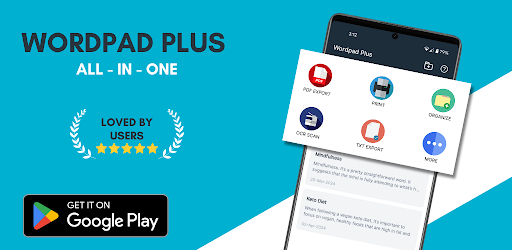
Create polished documents with full formatting control: bold, italic, underline, font sizes, text colours, alignment, bullet lists, numbered lists, and 20+ styling tools. Whether you're drafting a professional report or writing your next novel, Wordpad Plus gives you everything Microsoft Word offers — without the subscription.
ADVANCED OCR SCANNER
Point your camera at any printed or handwritten text and Wordpad Plus converts it to editable content in seconds. Perfect for digitising lecture notes, receipts, contracts, and books. Faster than typing, more accurate than alternatives.
PDF TOOLS BUILT IN
Export any document as a professional PDF in one tap. Import existing PDFs and Word files (.docx), edit them, then share instantly. No separate PDF app needed — it's all here.
DOCUMENT MANAGER
Organise everything with folders and subfolders. Protect sensitive files with PIN lock. Recover accidental deletions from the recycle bin. Back up and restore your entire library. Your documents stay on your device — not on someone else's server.
WHO IS WORDPAD PLUS FOR?
— Students drafting essays, assignments, and resumes
— Writers and novelists who need a distraction-free writing app
— Office professionals who need a Microsoft Word alternative on Android
— Job seekers who need to create and export a resume quickly
— Anyone who wants a rich text editor that works offline
WHY WORDPAD PLUS OVER GOOGLE DOCS OR MICROSOFT WORD?
Works 100% offline. No mandatory account sign-in. Zero data collection — your documents never leave your device. Lightweight install. No subscription required for core features.
KEY FEATURES
+ Full word processor with rich text formatting
+ OCR scanner — image to editable text
+ PDF export and .docx import
+ Offline writing — works without internet
+ Dark Mode for comfortable night writing
+ PIN lock, Recycle Bin, Backup & Restore
+ Document signing on Android
+ Zero data collected — complete privacy
Download Wordpad Plus free today. Write more. Share easily. Own your words.